LOOKUP2D
=LOOKUP2D(array, [row_lookup], [col_lookup])
| Argument | Description | Example |
|---|---|---|
| array | The array containing the entire 2D data set, including column and row labels. | A1:E20 |
| row_lookup | (Default=all rows) The value(s) to search for in the row labels (first column) | "Wizard" |
| col_offset | (Default=all columns) The value(s) to search for in the column labels (first row) | {"Armor","Skill"} |
Description
LOOKUP2D is a convenient function for performing two-dimensional lookups for arrays or tables that have row and column labels. Two-dimensional lookups are not terribly difficult to do with native Excel functions, but the task comes up so often in Excel Esports challenges, so I decided to share this simple example.
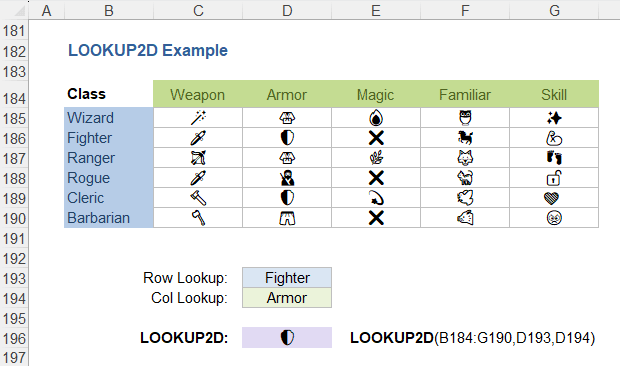
In the above example we have a situation where the rows are character classes and the columns are various traits. The task is to find the symbol corresponding to a particular class and trait - a classic 2D lookup.
To see how this type of thing was done many years ago, see my article about 2D Lookups Using VLOOKUP and INDEX-MATCH. These days I would probably use XLOOKUP, and XLOOKUP is in fact used within the LOOKUP2D lambda function.
I'm not going into much detail with examples because it's a pretty simple function and this example demonstrates it pretty well with just the image.
Return an entire row/column: After a recent Excel competition, I updated the formula to return an entire row or column if you leave the other parameter blank. In the above example, to return the entire row matching "Ranger" you would use =LOOKUP2D(B184:G190,"Ranger",).
Lambda Formula
This code for using LOOKUP2D in Excel is provided under the License as part of the LAMBDA Library, but to use just this function, you may copy the following code directly into your spreadsheet.
Code to Create Function via the Excel Labs add-in
/**
* Perform a 2D lookup in a table with row and column labels.
*/
/*
* @param array:      The entire table, including row and column labels
* @param row_lookup: (Default=all rows) The value(s) to search for in the first column (row labels)
* @param col_lookup: (Default=all columns) The value(s) to search for in the first row (column labels)
* @url https://www.vertex42.com/lambda/lookup2d.html
*
* Notes:
*  - If row_lookup is omitted, returns all rows for the specified col_lookup.
*  - If col_lookup is omitted, returns all columns for the specified row_lookup.
*  - If both are omitted, returns the entire data array without the row and column labels.
*  - row_lookup and col_lookup can be multiple values, enabling 1-many, many-1, or element-wise lookups.
*  - Uses XMATCH and INDEX, so most errors like NA() mean no match was found
*/
LOOKUP2D = LAMBDA(array, [row_lookup], [col_lookup],
LET(doc,"https://www.vertex42.com/lambda/lookup2d.html",
    version,"9/24/2026 - Updated to allow optional lookups",
    row_labels, DROP(TAKE(array,,1),1),
    col_labels, DROP(TAKE(array,1),,1),
    data_array, DROP(array,1,1),
    row_index, IF(ISOMITTED(row_lookup),
        SEQUENCE(ROWS(data_array)),
        XMATCH(row_lookup,row_labels,0)
    ),
    col_index, IF(ISOMITTED(col_lookup),
        SEQUENCE(,COLUMNS(data_array)),
        XMATCH(col_lookup,col_labels,0)
    ),
    INDEX(data_array,TOCOL(row_index),TOROW(col_index))
));

Follow Us On ...