FILL Function - Fill Blank Cells in Excel
=FILL(array,[direction],[testFunction],[fill_with],[exclude])
| Argument | Description | Example |
|---|---|---|
| array | An array or range of numbers or text | {"A",1;2,"B"} |
| direction | (Optional, Default=1) The fill direction with 0 or "all" for no specific direction, 1 or "d" or "down" for Fill Down, 2 or "l" or "left" for Fill Left, 3 or "u" or "up" for Fill Up, 4 or "r" or "right" for Fill Right | "d" |
| testFunction | (Optional, Default=ISBLANK) A built-in or Lambda function that tests a single value at a time and returns TRUE/FALSE | ISNA |
| fill_with | (Optional, Default="") A value to use for when direction=0 or when there are no adjacent values (such as filling down but the top cell is blank). | blank |
| exclude | (Optional, Default=empty) List of column (or row) numbers to exclude from being filled | {1,2} |
Fill Blank Cells in Excel (the non-lambda method)
The non-formula method to fill blank cells in Excel from the value above is this (many youtube videos demonstrate this approach):
- Select the range and press Ctrl+g > Special.
- Select the Blanks option and press Okay. This selects all of the blanks in the range.
- Press = and select the cell above the cell you are editing (use a relative reference).
- Important: Press CTRL+ENTER. This adds the formula into each of the selected cells.
This method modifies your existing dataset, which can be great, and this is very fast.
Fill Blank Cells using FILL or FILLDOWN
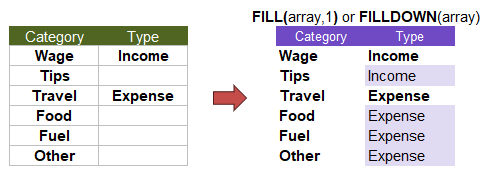
To use a formula, you can use the custom lambda function FILL(array) or FILLDOWN(array). In the example below, we have some budget categories and want to filter by Type. However, to do lookups or filters based on Type or to flatten the table, we first need to fill in the blanks.
The testFunction Option
Examples from the OARobot add-in inspired another feature for this function - the optional testFunction parameter. This can add even more power to FILL or FILLDOWN, making the functions useful for more than just blank cells.
The built-in functions that can be used for the testFunction parameter include ISBLANK (the default), ISNA, ISODD, ISEVEN, ISERROR, ISTEXT, ISREF, ISFORMULA, ISNUMBER, ISLOGICAL, and ISNONTEXT. You can also create a simple LAMBDA to use a custom expression such as val="b":
=FILLDOWN(array, LAMBDA(val, val="b") )
Note: If no testFunction is provided, the function will default to ISBLANK, meaning only cells that are truly blank will be filled.
Other Fill Directions and Optional Parameters
The image below shows the behavior of the FILL function for different directions and how the fill_with parameter behaves. These examples are excluding column (or row) number 3. Note that the exclude parameter applies to columns if you are filling down or up (or "all"), and it applies to rows if you are filling left or right.
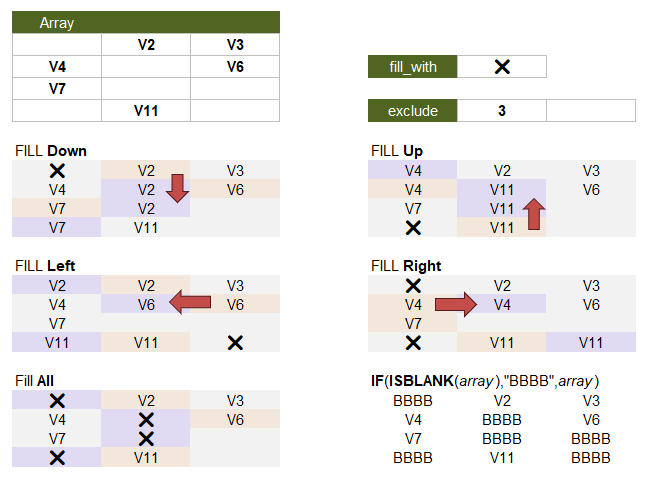
The "all" option ignores adjacent values and is basically the same thing as using IF( testFunction(array), value, array), except that FILL handles the excluded column(s).
Other Functions in the FILL Family
Note: The Vertex42 lambda library GIST file and template only include the FILL function!
The FILL function was designed as a more general function than FILLDOWN, FILLLEFT, FILLUP, or FILLRIGHT, making these other functions unnecessary if you have the FILL function. FILL was also designed to avoid the need for other lambda function dependencies.
The FILLDOWN function serves as the core logic. The other functions, FILLUP, FILLLEFT, and FILLRIGHT reuse this logic with transformations such as FLIPUD, ROT_90 and TRANSPOSE.
FILLRIGHT(array,[testFunction])
- Fills blank cells in an array by propagating the value from the left to the right.
- Internally uses FILLDOWN with TRANSPOSE.
=TRANSPOSE(FILLDOWN( TRANSPOSE(array),ISBLANK ))
FILLUP(array,[testFunction])
- Fills blank cells in an array by propagating the value from the cell below upward.
- Internally uses FILLDOWN with FLIPUD.
=FLIPUD(FILLDOWN(FLIPUD(array),ISBLANK))
FILLLEFT(array,[testFunction])
- Fills blank cells in an array by propagating the value from the right to the left.
- Internally uses FILLDOWN with ROT_90.
=ROT_90(FILLDOWN(ROT_90(array),ISBLANK),-1)
Lambda Formula
This code for using FILL in Excel is provided under the License as part of the LAMBDA Library, but to use just this function, you may copy the following code directly into your spreadsheet.
Code for AFE Workbook Module (Excel Labs Add-in)
/**
* Fill blanks in the specified direction based on neighboring values.
* Used for flattening data tables, ungrouping and unpivot.
*/
/*
* Inputs:
*   - array: The array in which you want to fill in blanks
*   - direction: 0=all, 1 or "d" =down, 2 or "l" =left, 3 or "u" =up, 4 or "r" =right
*   - testFunction: ISBLANK by default. Could be ISNA, ISTEXT or LAMBDA(val, val="b")
*   - fill_with: Use for direction=0 and cells with non-adjacent values
*   - exclude: List of column or row numbers to exclude
*
* Notes:
*   - No dependencies on other lambda functions
*/
FILL = LAMBDA(array,[direction],[testFunction],[fill_with],[exclude],
LET(doc,"https://www.vertex42.com/lambda/fill.html",
    // Handle directions (Default is down)
    // Convert some textual inputs to numeric codes
    direction,IF(ISOMITTED(direction),1,
        SWITCH(direction,
            "",1,1,1,"1",1,"d",1,"down",1,
            2,2,"2",2,"l",2,"left",2,
            3,3,"3",3,"u",3,"up",3,
            4,4,"4",4,"r",4,"right",4,
            0,0,"all",0,
            direction // If an invalid input is given, use it as-is
        )
    ),
    // Default fill_with value is ""
    fill_with,IF(OR(ISOMITTED(fill_with),ISBLANK(fill_with)),"",fill_with),
    // Default testFunction is ISBLANK
    testFunction,IF(ISOMITTED(testFunction),ISBLANK,testFunction),
    // flipVert function. See FLIPUD
    flipVert, LAMBDA(array, LET(rows,ROWS(array),
        CHOOSEROWS(array,SEQUENCE(rows,1,rows,-1))
    )),
    // flipHoriz function. See FLIPLR
    flipHoriz, LAMBDA(array, LET(cols,COLUMNS(array),
        CHOOSECOLS(array,SEQUENCE(cols,1,cols,-1))
    )),
    // rotateArray function, See ROT_90
    rotateArray, LAMBDA(array,direction,
        IF(direction=-1,
            flipVert(TRANSPOSE(array)),
            flipHoriz(TRANSPOSE(array))
        )
    ),
    // fillDown function, one column at a time
    fillDown, LAMBDA(array,
        REDUCE("",SEQUENCE(COLUMNS(array)),LAMBDA(acc,i,
            LET(col_i,INDEX(array,,i),
                // Apply filling logic unless column is in the exclude list
                filled,IF(OR(ISOMITTED(exclude),ISERROR(MATCH(i,exclude,0))),
                    // Scan column top to bottom, filling blanks
                    SCAN(fill_with,col_i,LAMBDA(prev,this,IF(testFunction(this),prev,this))),
                    // If column is excluded, replace blanks with "" instead of 0
                    IF(ISBLANK(col_i),"",col_i)
                ),
                IF(i=1,filled,HSTACK(acc,filled))
            )
        ))
    ),
    // Handle direction options
    result,SWITCH(direction,
        1, fillDown(array),
        2, rotateArray(fillDown(rotateArray(array,-1)),1),
        3, flipVert(fillDown(flipVert(array))),
        4, TRANSPOSE(fillDown(TRANSPOSE(array))),
        // Fill using `fill_with` if direction = 0, handling excluded columns
        MAKEARRAY(ROWS(array),COLUMNS(array),LAMBDA(i,j,
            IF( OR(ISOMITTED(exclude),ISERROR(MATCH(j,exclude,0))),
                IF( testFunction(INDEX(array,i,j)),fill_with,INDEX(array,i,j)),
                IF( ISBLANK(INDEX(array,i,j)),"",INDEX(array,i,j))
            )
        ))
    ),
    result
));
Here is the code for the separate FILLDOWN, FILLRIGHT, FILLUP and FILLLEFT functions.
/**
* Fills blanks using the value from above in the array.
*/
FILLDOWN = LAMBDA(array,[testFunction],
LET(doc,"https://www.vertex42.com/lambda/fill.html",
    testFunction,IF(ISOMITTED(testFunction),ISBLANK,testFunction),
    REDUCE("",SEQUENCE(COLUMNS(array)),LAMBDA(acc,i,
        LET(colx,INDEX(array,,i),
            filled,SCAN("",colx,
                LAMBDA(acc,val,IF(testFunction(val),INDEX(acc,ROWS(acc)),val))
            ),
            IF(i=1,filled,HSTACK(acc,filled))
        )
    ))
));
/**
* Fills blank cells in an array by propagating the value from the left to the right.
*/
FILLRIGHT = LAMBDA(array,[testFunction],
LET(doc,"https://www.vertex42.com/lambda/fill.html",
    TRANSPOSE(FILLDOWN(TRANSPOSE(array),testFunction))
));
/**
* Fills blank cells in an array by propagating the value from the cell below upward.
*/
FILLUP = LAMBDA(array,[testFunction],
LET(doc,"https://www.vertex42.com/lambda/fill.html",
    FLIPUD(FILLDOWN(FLIPUD(array),testFunction))
));
/**
* Fills blank cells in an array by propagating the value from the right to the left.
*/
FILLLEFT = LAMBDA(array,[testFunction],
LET(doc,"https://www.vertex42.com/lambda/fill.html",
    ROT_90(FILLDOWN(ROT_90(array),testFunction),-1)
));
See Also
FLIP, ROT_90, REPELEM, REPARRAY, Filter Functions
Acknowledgements
Note: I created these FILL functions based in part on functions I've seen other people use or talk about, but before seeing Hazem Hassan's post about his FILLDATA lambda function. I decided to go ahead and include this FILL function in my library. It's likely that Hazem's code is better than my FILL function, so if you like the idea of a FILL function in Excel, make sure to Vote for Hazem Hassan's FILLDATA Function!