THUNKS for Mortals
The topic of thunks is advanced², meaning an advanced concept (thunks) within an already advanced feature (LAMBDA). The purpose of this page is to make thunks in Excel usable by mere mortals. I'm going to try to explain them without using advanced computer science terms (because I don't really understand those anyway).
Why use thunks? Mainly to (1) improve calculation efficiency and/or (2) work around limitations of existing formulas, especially by using arrays of thunks.
When you define a function using LAMBDA, but do not call it, the code within the LAMBDA is not evaluated. It is only evaluated when you explicitly call the function using (). This basic property of the LAMBDA function, combined with the fact that Excel can store function definitions in arrays, is what enables the main reasons to use thunks.
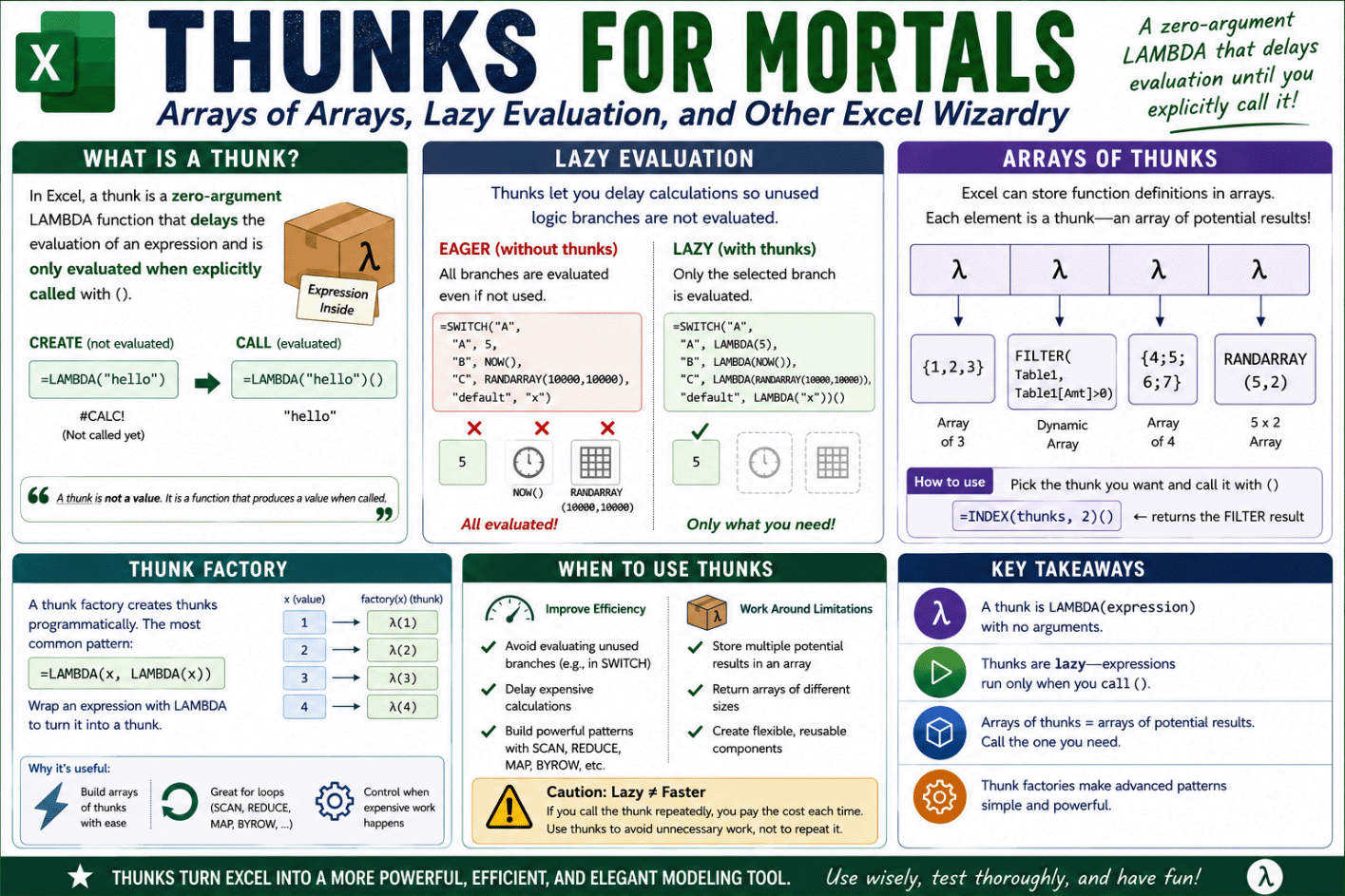 Infographic created by AI based on this article. Click to Enlarge.
What is a thunk?
Definition: In Excel, a thunk is a zero-argument LAMBDA function that (1) delays the evaluation of an expression and (2) is only evaluated when explicitly called with (). A thunk factory is a function that produces thunks programmatically, commonly written as LAMBDA(x,LAMBDA(x)).
The most basic thunk is:
=LAMBDA("hello")

or more generally

=LAMBDA(expression)
This is a LAMBDA that has no arguments. The body of the LAMBDA is only the expression "hello". The only thing it does is define the expression. It does not evaluate it ... yet.
Just like any other lambda =LAMBDA("hello") by itself will show a #CALC! "error" because it has not yet been called. The #CALC! error in this case simply means Excel is displaying a function value that hasn't been called yet.
You evaluate a thunk by using () when calling it like this:
=LAMBDA("hello")()

Result: "hello"
Important: A thunk is not a value. It is a function that produces a value when called.
We can use LET to (a) name the thunk and then (b) call it like this:
=LET(
    mythunk, LAMBDA("hello"),
    mythunk()
)
If you are familiar with LAMBDA, you may be wondering "What's the big deal? All we've done so far is point out that a thunk seems like the most useless and pointless version of a LAMBDA there could possibly be!" Well, let's move on to the good stuff.
Lazy Evaluation
Improving calculation efficiency is one of the main reasons for using thunks. Sometimes, efficiency can be improved by preventing unused logic branches from evaluating, or by delaying evaluation of an expression. Lazy isn't always better, but let's talk about situations where this property might help.
Most functions in Excel behave as if they are "Eager" in the sense that every expression is evaluated even when their results may not be used. However, a thunk is "Lazy" because it doesn't run until you call it. Remember that a thunk is a function, and any function you define has this same property: a LAMBDA function is not evaluated when defined - only when called.
A thunk is lazy: it defines an expression that is not evaluated until you explicitly call it with ().
Here is an example where the expression RAND() is defined but never called:
=LET(
  myThunk, LAMBDA( RAND() ),
  "Nothing random happens"
)
Even though RAND() appears in the formula, it is never evaluated because the function named myThunk is never called.
The simplest useful example I can think of is the SWITCH function. The SWITCH function is "Eager" because the expressions for all of the cases are evaluated, even though only one of the cases is returned.
=LET(
  sw,SWITCH("A",
    "A", 5,
    "B", NOW(),
    "C", RANDARRAY(10000,10000),
    "default"
  ),
  sw
)
In the above example, even though we only want to retrieve the expression for "A" (which is 5), Excel will also evaluate the expressions NOW() and RANDARRAY(10000,10000).
Using RANDARRAY(10000,10000) is an easy test to see if Excel is evaluating a branch because you get the "Excel ran out of resources" error message when Excel tries to evaluate it. If your computer is more powerful than mine, you may need to increase the size of RANDARRAY until you get an error message. Warning, save your file frequently. If Excel crashes and lose your data, don't say I didn't warn you.
Another way to test if an unused branch is evaluated is to create a volatile VBA-based UDF that outputs a datetime to the debug "Immediate" window" - an idea from Diarmuid Early (originating from Charles Williams)
▼ Show WasEvaluated()
Here's the first cool thing about thunks: With very little complexity, we can "THUNK the SWITCH" so that SWITCH does not evaluate every case.
Yes, we are using THUNK as a verb now.
Definition of THUNK (as a verb): Writing the code so that a function returns thunks instead of values.
The following SWITCH has been THUNKED!
EXAMPLE: A THUNKED SWITCH
=LET(
  sw,SWITCH("A",
    "A", LAMBDA( 5 ),
    "B", LAMBDA( NOW() ),
    "C", LAMBDA( RANDARRAY(10000,10000) ),
    LAMBDA( "default" )
  ),
  sw()
)
Guess what? This code runs without the "Excel ran out of resources" error because RANDARRAY(10000,10000) is never evaluated!
All I did was change the code within SWITCH so that all the expressions it might return are now thunks. Now, because every case within SWITCH would return a thunk, we can consider the variable sw to be a named thunk. To evaluate sw we must call it using sw().
Let's summarize the above example
- Each LAMBDA(expression) is a thunk
- SWITCH() returns one of those thunks
- The value assigned to sw is a thunk
- sw() calls the thunk and triggers evaluation
To test your understanding, what would happen if all of the cases in the SWITCH were thunks, except for the default expression? In other words, what's wrong with this:
EXAMPLE: INCORRECTLY THUNKED SWITCH
=LET(
  sw,SWITCH("Q",
    "A", LAMBDA( 5 ),
    "B", LAMBDA( NOW() ),
    "C", LAMBDA( RANDARRAY(10000,10000) ),
    "default"
  ),
  sw()
)
Answer: There is no "Q" case, so SWITCH returns "default" which is not a thunk. This means that for the default case, sw is not a thunk - it is not a function - which means that sw() will fail with a #VALUE! error.
Here's what we've learned so far
- A thunk is LAMBDA(expression)
- A thunk is lazy - the expression is not evaluated right away
- A thunk becomes a value only when you call it with ()
- You can assign a thunk to a variable, making that variable a thunk
- If code returns thunks instead of values, we say it has been thunked
- Thunks can delay or avoid evaluation, which might improve efficiency
Lazy ≠ Better
Before we move on, I want to mention that even though by definition a thunk is always lazy, when it comes to efficiency, lazy is not always better. For example, if you plan to call myThunk() many times, and it contains an expensive calculation, it may be faster to evaluate it once and reuse the value instead.
Here is a very inefficient use of a thunk:
=LET(
  myThunk, LAMBDA( SUM(SEQUENCE(10000)) ),
  myThunk() + myThunk() + myThunk()
)
In this example, you end up evaluating SUM(SEQUENCE(10000)) three times.
Arrays of Arrays
Another primary reason for using thunks is as a work-around for things Excel cannot do normally.
Excel does not support arrays whose elements are arrays of different sizes. When you use VSTACK or HSTACK, the resulting array is always rectangular. But, we can simulate an "array of arrays" by creating an array of thunks.
In Excel, a named array can store number values, text values, and even function values. This means that you can create an array of thunks using VSTACK, MAKEARRAY, MAP, SCAN, etc.
It doesn’t matter how the thunk is defined or what it contains. When an array stores a function (a LAMBDA), Excel stores only the definition of the function, not the result of running it.
This means that each thunk in the array can return an array of a different size, or even a completely different type of value.
The thunk=package analogy: A thunk is a single "thing" from Excel's perspective. A thunk is like a package you can pass around without opening, and the package can contain nearly anything. Calling it with () is how you open the package. An array of thunks is just a structured collection of packages that Excel can store, move, and index without forcing the contents to be created, evaluated, or opened.
Here is a very simple example of an array of thunks:
=LET(
  th_array,
    VSTACK(
      LAMBDA( {1,2,3} ),
      LAMBDA( {4;5} ),
      LAMBDA( NOW() )
    ),
  res_th,INDEX(th_array,2,1),
  res_th()
)
This demonstrates:
- th_array is a 3x1 array of thunks, created by using VSTACK to stack 3 thunks
- INDEX(th_array,2,1) returns the function (thunk) in row 2 column 1, still unevaluated
- res_th() calls the thunk, which evaluates the expression and returns {4;5}
- NOW() is never evaluated in this example
With an array of thunks, you must be explicit in defining both the row and column in the INDEX function so that INDEX returns a single value rather than a 1x1 array. The shortcut INDEX(th_array,2) will not work ("Excel ran out of resources" error). You would need to use INDEX(th_array,2,1) or @INDEX(th_array,2).
This was just a very basic example of an array of thunks. But, what we have demonstrated here is that by storing zero-argument LAMBDA functions as an "array of thunks," we can store thunks representing arrays of different sizes within a single array, manipulate that array, and evaluate the thunk(s) later.
See Owen Price's article for another example of how an array of thunks can contain arrays of different sizes.
Let's look at example where the efficiency gained from using thunks is based on delayed evaluation.
After writing up this article, I asked ChatGPT to come up with an idea for a menu of reports that are defined using thunks, so that you only need to calculate the chosen one rather than calculate everything before choosing the one you want. Here is the example created first as a thunked SWITCH and second as an array of thunks:
/* Choice in cell B1: dropdown: "Sales", "Inventory", "Exceptions" */
=LET(
  choice, B1,
  report_thunk,
    SWITCH(choice,
      "Sales",      LAMBDA(SORT(FILTER(SalesTbl, SalesTbl[Amount]<>0), 3, -1)),
      "Inventory",  LAMBDA(SORTBY(InventoryTbl, InventoryTbl[SKU])),
      "Exceptions", LAMBDA(FILTER(LogTbl, LogTbl[Status]="ERROR")),
      LAMBDA("UNHANDLED")
    ),
  report_thunk()
)

=LET(
  choice, B1,
  report_names, {"Sales";"Inventory";"Exceptions"},
  report_thunks,
    VSTACK(
      LAMBDA(SORT(FILTER(SalesTbl, SalesTbl[Amount]<>0), 3, -1)),
      LAMBDA(SORTBY(InventoryTbl, InventoryTbl[SKU])),
      LAMBDA(FILTER(LogTbl, LogTbl[Status]="ERROR"))
    ),
  INDEX(report_thunks, XMATCH(choice, report_names, 0))()
)
Without thunks, the typical approach would be this:
=LET(
  sales, SORT(FILTER(...)),
  inv,   SORTBY(...),
  exc,   FILTER(...),
  SWITCH(choice, "Sales", sales, "Inventory", inv, "Exceptions", exc)
)
That computes all three large arrays on every recalc. Using the thunk examples, it computes only the one you request. This is not an insignificant micro-optimization - the difference in calculation speed can be very significant. With thunks, you could have a usable dashboard, while doing it the inefficient way may result in an annoyingly slow Excel lag.
Thunks as a Work-Around
If delayed evaluation was all that thunks were good for, they would still be valuable. However, there is another powerful reason to use thunks: to work around the limitations of existing Excel functions!
Each iteration of MAKEARRAY or MAP normally only lets you return a single value (not an array). That single value could be a thunk. So, if you want each iteration to return an array, you can thunk the array first. Then, unpack the thunk later.
Here is a simple example where MAP creates an array of thunks. Each thunk, when later called, returns a different-sized array.
=LET(
  data, {6;7;42},
  th_array, MAP( data, LAMBDA(v,
    LAMBDA( SEQUENCE(1,v) )
  )),
  th, INDEX(th_array,2,1),
  th()
)

Result: {1,2,3,4,5,6,7}
In this example, LAMBDA(SEQUENCE(1,v)) is the thunk.
What happens in detail:
- data is defined as a vector containing 3 values: {6;7;42}.
- MAP evaluates LAMBDA(v, LAMBDA(SEQUENCE(1,v)) ) once for each value in data. This means that for each value, MAP creates a new thunk defined as LAMBDA(SEQUENCE(1,v)) with the current value of v remembered.
- The first thunk is defined as LAMBDA( SEQUENCE(1,v) ) with v bound as 6.
- The second thunk is defined as LAMBDA( SEQUENCE(1,v) ) with v bound as 7.
- The third thunk is defined as LAMBDA( SEQUENCE(1,v) ) with v bound as 42.
- MAP returns these three thunks as an array, which is assigned to th_array.
- th, INDEX(th_array,2,1) retrieves the second thunk from the array.
- th is now defined as the thunk LAMBDA( SEQUENCE(1,v) ) with v bound as 7.
- Calling th() evaluates the thunk resulting in {1,2,3,4,5,6,7}
It may be convenient to think of "LAMBDA(SEQUENCE(1,v)) with v bound as 6" as if it were simply LAMBDA(SEQUENCE(1,6)). This way of thinking is fine, but remember that nothing within the LAMBDA( ) is actually evaluated until the function is called. Excel does not pre-calculate the result and store it. It stores the function definition along with the values it will need later.
This distinction becomes important when using volatile functions like RAND(). The thunk LAMBDA(RAND()) is stored as just the function definition. It is not stored as something like LAMBDA(0.2345) because RAND() is not evaluated until the thunk is called.
Another work-around example: SCAN is a popular function for thunking because it outputs the accumulator at each iteration (unlike REDUCE which only outputs the final result). SCAN doesn't like it when you try to store an array as the accumulator (unlike REDUCE), but SCAN is perfectly happy storing a thunk as the accumulator.
In this example we are going to perform a sequence of moves using {row,col} offsets. We'll start with location {0,0} and then apply each move in sequence, storing each visited location in our thunked array as we go.
LET(
  comment_1,"A sequence of moves (row_offset, col_offset)",
  moves, {0,1; 1,0; 1,0; 0,-1; -1,0; 0,1},
  comment_2,"SCAN returns an array of thunks, one thunk per move",
  th_array,
    SCAN(
      LAMBDA( {0,0} ),
      SEQUENCE(ROWS(moves)),
      LAMBDA(path_th,k,
        LET(
          rem_1, "Unpack the path_th thunk to get the array of locations",
          path, path_th(),
          rem_2, "Get the last location row from the array",
          last, TAKE(path, -1),
          rem_3, "Get the next offset from the moves array",
          step, INDEX(moves, k, ),
          rem_4, "Add the offset to the last location to get the next location",
          next, last + step,
          rem_5, "Thunk the stacking of the previous path with the next location",
          LAMBDA( VSTACK(path, next) )
        )
      )
    ),
  comment_3, "Call the thunk after the 4th move to get the path so far",
  INDEX(th_array, 4, 1)()
)

Result:
 { 0,0;
   0,1;
   1,1;
   2,1;
   2,0 }
In this example, notice where the thunks are defined (highlighted with red font). The starting value is the thunk LAMBDA({0,0}), representing the initial location. The accumulator, path_th, is unpacked (evaluated) as the first step in LET so that we can retrieve the last {x,y} location from the array.
We thunked VSTACK(path,next) as the last step in SCAN to make it the new path_th accumulator value. This means that the accumulator stores a function definition "LAMBDA(VSTACK(path,next)) with the variables path and next bound as arrays of specific values". VSTACK would not actually be evaluated until we call it in the next step at "path, path_th()".
We could instead thunk the entire LET(...) portion of code within SCAN. Or, we could evaluate VSTACK(path,next) before thunking the result. For example, we could do this:
...
next, last + step,
stacked, VSTACK(path,next),
LAMBDA( stacked )
...
In this example, we are not worrying about efficiency or lazy vs. eager evaluation. Instead, we are using a thunk to get SCAN to work with an array as an accumulator. The accumulator can't be an actual array, but you can thunk an array or an expression and store that thunk as the accumulator. The thunk can be something simple like LAMBDA(array), or it can be something more complicated like LAMBDA(LET(...)).
To summarize this section:
- Excel can store an array of thunks, like storing an array of packages.
- Each thunk in the array can hold a different expression, an expression that when evaluated (unpackaged) could produce an array of a different size. This allows us to work with arrays of arrays (in a way).
- We can use thunks with functions like SCAN, MAP, and MAKEARRAY to work around the normal limitation of returning only a single value within each iteration.
Remember the thunk=package analogy. The last couple examples showed how MAP and SCAN could create and return arrays of thunk packages. That leads to our next topic: thunk factories.
Thunk Factories
Up to this point, every thunk we've looked at has been written directly as LAMBDA(expression). But how do you process a bunch of data programmatically, to automatically convert structured data into arrays of thunks?
The answer is another lambda pattern that you may see described as a "thunk" but which I will refer to as a "thunk factory." It is this:
=LAMBDA(x, LAMBDA(x))
In Excel terms, this function evaluates the value passed as x and then returns the thunk LAMBDA(x). You can think of this function as converting x into a thunk, a function that wraps (or packages) x in a thunk, or a function that builds thunks.
A thunk factory is a function that creates thunks by packaging values inside zero-argument LAMBDA functions
Here is a very simple example of converting the value 5 into a thunk and then calling the thunk to return 5.
=LET(
  makeThunk, LAMBDA(x, LAMBDA(x)),
  th, makeThunk(5),
  th()
)
This type of thunk factory does not delay evaluation of the expression passed to it. We can test this by using our RANDARRAY(10000,10000) trick.
=LET(
  makeThunk, LAMBDA(x, LAMBDA(x)),
  th, makeThunk(RANDARRAY(10000,10000)),
  10
)
Here, the result should be 10 and we aren't even using the th variable after defining it. But, makeThunk still evaluates RANDARRAY(10000,10000) before wrapping it in a thunk, resulting in an "Excel ran out of resources" error message.
If a thunk factory does not delay evaluation, why is a thunk factory important? Answer: Instead of manually defining each individual array or function, the thunk factory lets you programmatically create a thunk or an array of thunks.
You can pass that array of thunks into functions like SCAN, or create thunks within functions like MAP, MAKEARRAY or SCAN that would otherwise not be able to return arrays of arrays - like the examples shown at the end of the last section.
The example in the article "I THUNK; therefore I SCAN" by Craig Hatmaker is a perfect example of using BYCOL to convert rows of an array into individual thunks that are then passed to SCAN, for the purpose of efficiency gains.
SCAN can take an array as input, but it scans through each value one a time (not one row at a time). That typically leads people to using a SEQUENCE-style index for SCAN and then using INDEX(rate,i) and INDEX(flow,i) within the SCAN function to get each incremental value from the original data arrays.
He shows that you can first use BYCOL and a lambda factory to convert the rate and flow arrays into an array of 2x1 thunks. Then, pass that array of thunks to the SCAN function. The result is that within the SCAN function, each use of INDEX is only doing a lookup of a 2x1 array instead of a lookup of the full original array. And that makes all the difference.
IMPORTANT: The dramatic increase of speed in the SCAN example has nothing to do with delayed evaluation, and everything to do with creating and using an array of thunks to do more efficient lookups! 🤯
One Final Example
I used AI to help me come up with another example of the "array of different sizes" and I like this example because it reminds us to consider WHEN and HOW MANY TIMES to evaluate a thunk. Should we wrap a FILTER expression as a thunk or should we evaluate the FILTER expression first and wrap the result as a thunk?
The following data set represents a table named Orders with a Category and an Amount column.
Category Amount
A        10
A        15
B        5
C        8
C        12
C        20
I want to FILTER this table multiple times, based on Category. Three different categories means I would have three separate FILTER results. If I could store an array of arrays, it might look like this { {10,15}; {5}; {8,12,20} }, corresponding to categories {"A"; "B"; "C"}. But, Excel cannot store an array of arrays, so we will do this using thunks:
=LET(
  comment_1, "First, make an array of unique categories",
  cats, UNIQUE(Orders[Category]),
  comment_2, "Second, for each row of cats, create a filtered result",
  thunks,
    BYROW(cats,
      LAMBDA(cat,
        LAMBDA( FILTER(Orders[Amount], Orders[Category]=cat) )
      )
    ),
  thunks
)
We wrapped the FILTER(...) expression in a thunk because we need to return a single thing to BYROW.
Can we store the results of the FILTER as a thunk, rather than the FILTER expression itself? Yes, we can easily do that. We just need to make sure that the result is packaged as a thunk so BYROW can handle it.
=LET(
  cats, UNIQUE(Orders[Category]),
  thunks,
    BYROW(cats,
      LAMBDA(cat,
        LET(
          f, FILTER(Orders[Amount], Orders[Category]=cat),
          LAMBDA( f )
        )
      )
    ),
  thunks
)
At this point, what does thunks contain? Answer: an array of 3 thunks. The first thunk is "LAMBDA(f) with f bound as {10,15}". Let's just think of the other two thunks as LAMBDA({5}) and LAMBDA({8,12,20}).
So far, this example just returns an array of thunks, not yet evaluated. So, in Excel this would display as an array of #CALC! errors.
Our next step is to create a report with multiple outputs, including SUM, AVERAGE, and COUNT for each category.
=LET(
  cats, UNIQUE(Orders[Category]),
  thunks,
    BYROW(cats,
      LAMBDA(cat,
        LET(f, FILTER(Orders[Amount], Orders[Category]=cat),
          LAMBDA( f )
        )
      )
    ),
  sums,   MAP(thunks, LAMBDA(th, SUM(th()) )),
  avgs,   MAP(thunks, LAMBDA(th, AVERAGE(th()) )),
  counts, MAP(thunks, LAMBDA(th, ROWS(th()) )),
  VSTACK(
    {"Category","SUM","AVERAGE","COUNT"},
    HSTACK(cats, sums, avgs, counts)
  )
)
To generate the array of sums, we are looping through each one of the thunks using MAP and calculating the SUM by calling th(). Likewise for avgs and counts. This means that we are calling each individual thunk 3 times each. LAMBDA({10,15}) is called 3 times. LAMBDA({5}) is called three times. LAMBDA({8,12,20}) is called 3 times.
In this case, each thunk has stored the result of the FILTER expression. Evaluating the thunk to retrieve the array is almost no overhead.
If we had used the earlier version, the one where the thunk stored the FILTER(...) expression instead of evaluating FILTER first, we would be evaluating the FILTER(...) expression 9 times (instead of just 3). If FILTER was the slow part of the analysis, that would hurt efficiency.
Imagine a data set that is 1000s of rows. Deciding whether to thunk the FILTER(...) expression, or evaluate the FILTER first and thunk the result, could have a big impact.
This example isn't just about creating an array of arrays. It shows how using thunks lets you create expressions and make a deliberate decision about when exactly to evaluate those expressions.
Conclusion
It got kind of crazy there in the end, but that's because the use of thunks is an advanced² topic.
We showed how thunks are lazy, and how we can use that to our advantage. One of the uses for thunks is to avoid evaluation of unused logical branches, or to delay evaluation until you explicity need the result.
We've also seen how thunks can be used to work around some limitations of Excel, allowing us to simulate arrays of arrays by creating arrays of thunks.
Performance gains from thunks are not always about laziness. Sometimes they come from decreasing the cost of lookups by changing how data is packaged and delivered. This distinction becomes critical when working with iterative functions like SCAN, where array lookup cost may dominate performance.
Hopefully, this article was a useful primer on the concept of thunks, making them a bit more understandable.
One final parting thunk:
=LET(th, LAMBDA( LAMBDA( LAMBDA( "cheers") ) ), th()()() )
Comments or Suggestions?
Please email me or message me on LinkedIn.
Acknowledgements
Big thanks to Owen Price, Craig Hatmaker, Peter Bartholomew and Diarmuid Early for their feedback and suggestions!
- A generalised Lambda helper function that return arrays of arrays using bisection. - by Peter Bartholomew. One of the many articles by Dr. Bartholomew that includes thunks.
- I THUNK; thefefore, I SCAN! - by Craig Hatmaker. Describes speed boost from passing an array of small thunks to SCAN instead of using INDEX(large_array,i).
- What is a Thunk in Excel? - by Owen Price at flexyourdata.com. Shows the use of LAMBDA(x,LAMBDA(x)) and applies it to array-based patterns, including SCAN.
- Cell-Level Thunks in Excel Using #VALUE Arrays for Range-Reference Encapsulation - by Fredson Alves Pinho. This article shows that thunk behavior does not require LAMBDA. In my article, I focus on what may be called functional thunks - thunks created using zero-argument LAMBDA functions. Fredson’s article demonstrates what might be described as structural thunks, where delayed evaluation is achieved by how data is stored and referenced in the worksheet rather than by functions.
- Thunkit - by Travis Boulden on mrexcel.com. Is this the first use of LAMBDA(x,LAMBDA(x))?
- Thunk at Wikipedia.com
See Also
Create LAMBDA Functions, Candidates for the Library
Follow Us On ...