FILTER-Related Functions (Lambdas)
This page contains some of the FILTER-related functions that have graduated from my Candidates page. These are functions I would use mostly for convenience, or when I want to do something quickly without having to remember a longer formula (i.e. Excel Esport situation).
Functions on This Page
- ORA and ANDA(array1, array2, [array3], [array4], [array5]) :: Element-wise OR and AND for arrays.
- FILTERBYLIST(array,list,[match_col],[keep][case_sensitive]) :: Keep or Remove rows in array whose values in match_col appears in list
- SORTBYLIST(array,list,[match_col]) - Use a list (not necessarily the same size as array) to define the sort order.
- ISIN(this,in_array,[case_sensitive],[error_types]) - Returns TRUE/FALSE for each value in `this` that appears in `in_array`.
- ISALLIN(these,in_array,[case_sensitive],[error_types]) - Returns TRUE/FALSE if all of the values in `these` are found within `in_array`.
- REMOVEONCE(array,list,[match_col]) - Remove only one of each item in list from the array.
See Also:
- FILL(array,[direction]) :: Useful when using FILTER on a data set that includes blanks (perhaps due to creating a pivot table).
ORA and ANDA - Element-wise OR and AND for Arrays
=ORA(array1, array2, [array3], [array4], [array5])
=ANDA(array1, array2, [array3], [array4], [array5])
When you want to use more complicated logic with the FILTER function, the ORA and ANDA functions allow you to do the element-wise boolean comparisons needed for multiple conditions, without having to remember the mathematical logic.
The table below is a fictitious example of imperial starfighter missions (made with the help of AI). We want to retrieve the rows where Mission Type = "Patrol" OR "Recon", Flight Duration > 2, Enemy Encounters > 0, Outcome = "Successful", and the Date of Flight is between 2/1/7023 and 2/28/7023.
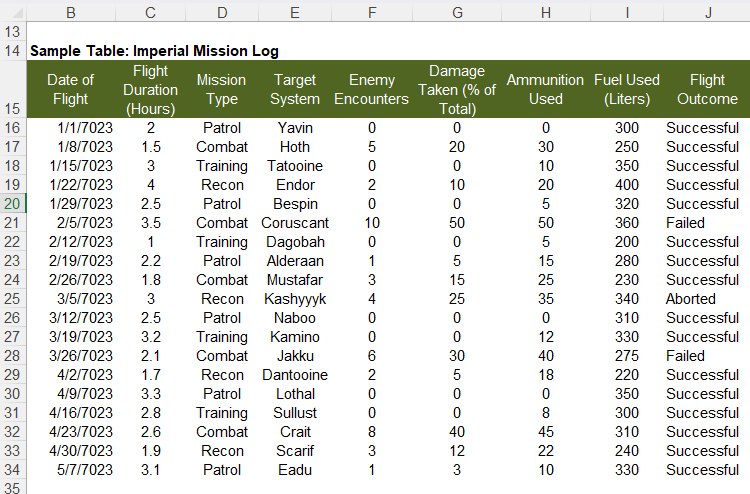
Using +* Logic:
=FILTER(B16:J34,(J16:J34="Successful")*(F16:F34>0)*((D16:D34="Patrol")+(D16:D34="Recon")>0)*(B16:B34>DATEVALUE("Feb 1, 7023")))

Using ANDA and ORA
=FILTER(B16:J34,ANDA(F16:F34>0,J16:J34="Successful",ORA(D16:D34="Patrol",D16:D34="Recon"),B16:B34>DATEVALUE("Feb 1, 7023")))
/**
* Element-Wise OR for Arrays. All array values should be boolean (or 0,1) and the same size.
*/
ORA = LAMBDA(array_1,array_2,[array_3],[array_4],[array_5],[array_6],
LET(doc,"https://www.vertex42.com/lambda/filter-functions.html",
    version,"2/27/2026 - Slightly more efficient",
    (array_6+array_5+array_4+array_3+array_2+array_1)>0
));
/**
* Element-Wise AND for Arrays. All array values should be boolean (or 0,1) and the same size.
*/
ANDA = LAMBDA(array_1,array_2,[array_3],[array_4],[array_5],[array_6],
LET(doc,"https://www.vertex42.com/lambda/filter-functions.html",
    version,"2/27/2026 - Slightly more efficient",
    array_3,IF(ISOMITTED(array_3),1,array_3),
    array_4,IF(ISOMITTED(array_4),1,array_4),
    array_5,IF(ISOMITTED(array_5),1,array_5),
    array_6,IF(ISOMITTED(array_6),1,array_6),
    (array_6*array_5*array_4*array_3*array_2*array_1)>0
));
FILTERBYLIST - Keep or Remove rows matching values from a list
=FILTERBYLIST(array, list, [match_col], [keep], [case_sensitive])
FILTERBYLIST keeps (default) or removes ALL rows in an array that match ANY value in the list. The match_col parameter allows you to specify which column (by index number) in the array is used for matching (the default is 1, meaning the 1st column of from_array).
I want a list of all the candidates for a cell in Sudoku. The row, column, and box arrays contain the existing numbers. I want to exclude those numbers from SEQUENCE(9).
=LET(
  row, {1,2,6},
  col, {5;1;6},
  box, {1,4,5,9},
  remove_list, VSTACK(TOCOL(row),TOCOL(column),TOCOL(box)),
  from_array, SEQUENCE(9),
  FILTERBYLIST(from_array, remove_list,,FALSE)
)
Result: {3;7;8}
This example shows how from_array can be 2D and the matching column does not need to be column 1. In thise case, you want to remove rows where column 2 contain either 101 or 104.
=LET(
  remove_list, {101;104},
  from_array, {"Alpha",101;"Bravo",102;"Charlie",103;"Delta",104},
  FILTEROUT(from_array, remove_list, 2, FALSE)
)
Result: {"Bravo",102;"Charlie",103}
/**
* FILTERBYLIST - Keep or Remove rows in array whose value in match_col appears in list
* List does not need to be the same number of rows as array.
*/
/*
* Inputs:
*   array  : Source table/array (m×n). All columns are returned. Filtered by column index (match_col).
*   list : A single-column or single-row (does not need to match size of array). Duplicates okay.
*   [match_col] : Optional (default=1) Index number specifying which column of from_array to use for matching.
*   [keep] : Optional (default TRUE) specifies whether to keep (true) or remove (false) the values
*   [case_sensitive] : Optional (default=FALSE) uses EXACT for comparison if TRUE.
* Output:
*   Preserves order. If no rows remain, returns NA().
* Notes:
*   list is first flattened flattened with TOCOL.
*   Blanks in array will be returned as 0
*   An error in remove_list, like =NA(), will match all errors in array
*/
FILTERBYLIST = LAMBDA(array, list, [match_col], [keep], [case_sensitive],
LET(doc,"https://www.vertex42.com/lambda/filter-functions.html",
    version, "10/29/2025",
    // Handle defaults
    list,TOCOL(list),
    match_col,IF(OR(ISOMITTED(match_col),ISBLANK(keep)),1,match_col),
    keep,IF(OR(ISOMITTED(keep),ISBLANK(keep)),TRUE,keep),
    case_sensitive, IF(ISOMITTED(case_sensitive),FALSE,case_sensitive),
    // Get key column used for matching
    key_col, INDEX(array,,match_col),
    // Check if an Error in list (means to match errors)
    error_in_remove_list,ISNUMBER(XMATCH(TRUE,ISERROR(list))),
    // Create array of TRUE/FALSE same # of rows as array
    match_array, IF(case_sensitive,
        MAP(key_col, LAMBDA(k, ISNUMBER(MATCH(TRUE,EXACT(k,list),0)))),
        ISNUMBER( XMATCH(key_col,list,0) )
    ),
    // Process errors and options
    res,IF(error_in_remove_list,
        FILTER(array,
            IF(keep,
                (ISERROR(array)+match_array)>0,
                NOT((ISERROR(array)+match_array)>0)
            ),NA()
        ),
        FILTER(array,IF(keep,match_array,NOT(match_array)),NA())
    ),
    res
));
SORTBYLIST - Sort values by matching values in a list
=SORTBYLIST(array, list, [match_col])
This is just a convenient wrapper for something you can do with SORTBY and XMATCH. You can use this when you want to sort based on an order that is not necessarily alphabetical or numeric, and based on a list that is not necessarily the same number of rows as your array.
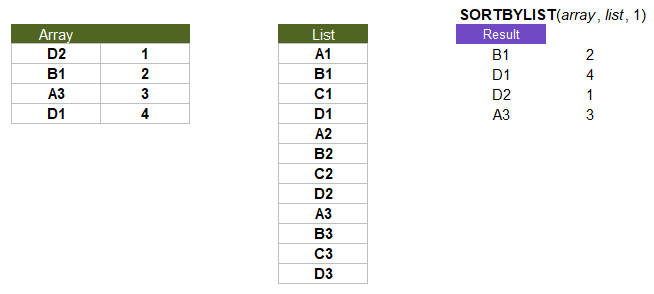
=SORTBY(array,XMATCH(CHOOSECOLS(array,match_col),list,0))
/**
* SORTBYLIST - Sort an array based on the order of values in a list. Values in the matching
* column NOT FOUND in the list are appended to the sorted list.
*/
/*
* Inputs:
*   array - The array to sort (by row)
*   list  - The sorting order is determined by matching values in this list
*   [match_col] - Optional (default=1) The column of array to use for sorting
* Notes:
*   Uses SORTBY after building a sort_by_index based on XMATCH
*   Blanks in the array become 0s in the output
*/
SORTBYLIST = LAMBDA(array,list,[match_col],
LET(doc,"https://www.vertex42.com/lambda/filter-functions.html",
    version, "10/29/2025",
    key_col,CHOOSECOLS(array,IF(ISOMITTED(match_col),1,match_col)),
    list,TOCOL(list),
    sort_by_index,XMATCH(key_col,list,0),
    SORTBY(array,sort_by_index,1)
));
ISIN - Check if values in `this` are within `in_array`
=ISIN(this,in_array,[case_sensitive],[error_types])
This function is mainly useful when you want to check each value of `this` array against a list of values within the in_array, while preserving the original shape of `this`.
The basic non-lambda version of "is in":
=ISNUMBER(XMATCH(this,TOCOL(in_array))
For ISIN, I've included a case-sensitive option as well as a way of checking error types, because might as well.
This example comes from the 2025 MEWC case "VStack-Man" by Coby Dombrowsky. There was a point where I wanted to convert all of the walls of the map to 1s.
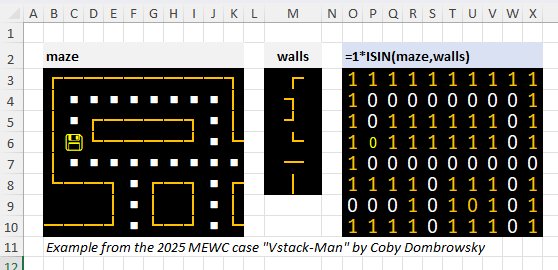
I've included ISIN on this page because it works really well as a condition for the FILTER function. The FILTERBYLIST function is a shortcut that behaves a lot like using ISIN within FILTER.
=FILTER(array,ISIN(COLUMNS(array,1),{"A","B","C"}) )
/**
* ISIN - Returns TRUE/FALSE for each value in `this` that appears in `in_array`.
*/
/*
* Inputs:
*   this: can be single value or an array of values to check
*   in_array: flattened via TOCOL before checking if `this` is contained somewhere within in_array
*   [case_sensitive]: Default=FALSE, If TRUE, uses EXACT for comparison
*   [error_types]: Default=FALSE, If TRUE, checks errors using ERROR.TYPE
* Outputs:
*   Returns an array the same shape as `this`
*/
ISIN = LAMBDA(this,in_array,[case_sensitive],[error_types],
LET(doc,"https://www.vertex42.com/lambda/filter-functions.html",
    version,"12/7/2025 - Original",
    case_sensitive,IF(ISOMITTED(case_sensitive),FALSE,case_sensitive),
    error_types,IF(ISOMITTED(error_types),FALSE,error_types),
    reg_values,IF(case_sensitive,
        MAP(this,LAMBDA(v,ISNUMBER(XMATCH(TRUE,EXACT(v,TOCOL(in_array)))))),
        ISNUMBER(XMATCH(this,TOCOL(in_array)))
    ),
    error_values,IF(error_types,
        LET(ethis,ERROR.TYPE(this),
            ein,ERROR.TYPE(in_array),
            ISNUMBER(XMATCH(ethis,TOCOL(ein)))
        ),
        FALSE
    ),
    (1*reg_values+1*error_values)>0
));
ISALLIN - Return TRUE if all of `these` are found within `in_array`
=ISALLIN(these,in_array,[case_sensitive],[error_types])
ISALLIN is a variant or extension of ISIN that checks if ALL of the values are within the array.
/**
* Returns TRUE/FALSE if ALL of `these` are found within `in_array`.
* Requires: ISIN (see documentation for ISIN)
*/
ISALLIN = LAMBDA(these,in_array,[case_sensitive],[error_types],
LET(doc,"https://www.vertex42.com/lambda/filter-functions.html",
    version,"12/7/2025 - Original",
    ROWS(TOCOL(these))=SUM(1*ISIN(these,in_array,case_sensitive,error_types))
));
REMOVEONCE - Remove one of each item in a list from an array
=REMOVEONCE(array, remove_items, [match_col])
The idea here is to remove one of each of the items in list from the array, based on match_col, which defaults to the first column of array. This is a sequential algorithm using REDUCE.
Use Case: Game simulation where you may have multiple copies of a card in a deck, but you only want to remove one (not all that match).
/**
* REMOVEONCE - Remove one of each item in a list from an array
*/
/*
* Inputs:
*   from_array  : The array to remove rows from (based on the matching column)
*   remove_list : A single-column or single-row array
*   match_col   : (default 1) specifies which column of from_array to use for matching
*/
REMOVEONCE = LAMBDA(from_array, remove_list, [match_col],
LET(doc,"https://www.vertex42.com/lambda/filter-functions.html",
    version,"10/30/2025",
    match_col,IF(ISOMITTED(match_col),1,match_col),
    final_array, REDUCE(from_array, remove_list,
        LAMBDA(current_array, item,
            LET(
                match_position, XMATCH(item, INDEX(current_array,,match_col) ),
                IF(ISNUMBER(match_position),
                    LET(
                        index_range, SEQUENCE(ROWS(current_array)),
                        FILTER(current_array, index_range<>match_position)
                    ),
                    current_array
                )
            )
        )
    ),
    final_array
));
- MEWC Microsoft Excel World Championship
- FILTER Function at support.microsoft.com

Follow Us On ...