BYRECT
=BYRECT(array, row_offset, col_offset, height, width, fn, [edge_mode], [pad_with])
| Argument | Description | Example |
|---|---|---|
| array | An array or range of numbers or text to be processed. | {"A",1;2,"B"} |
| row_offset | Row offset of the window start relative to the current cell position. Default=0 if blank. | 0 |
| col_offset | Column offset of the window start relative to the current cell position. Default=0 if blank. | 0 |
| height | Window height (# of rows). Default=1 if blank. | 3 |
| width | Window width (# of columns). Default=1 if blank. | 3 |
| fn | LAMBDA(subarray, expression) returning a scalar. | SUM |
| [edge_mode] | Default=1, 1:truncated, 2:circ 🍩, 3:vcirc 🧻, 4:hcirc 🥫, 5:padded, 6:vcirc+pad, 7:hcirc+pad | 1 |
| [pad_with] | Default="", Used to define the pad value, normally "" or 0 | 0 |
The example file below contains the BYRECT lambda plus a lot of other stuff that I used for testing and development. Consider it a work-in-progress.
⤓ Get the Example File (Filename: byrect-example.xlsx)
Description
BYRECT is a generalized sliding window function for arrays with an OFFSET-like behavior, but with quite a few specific edge mode options. BYRECT essentially slides a window (based on an offset and height/width) across every cell in the given array, and feeds the subarray to the function that you specify.
The fn parameter can be any function that (a) accepts an array as an input parameter and (b) returns a scalar (one value). Like other lambda helper functions such as BYROW, BYCOL, MAP, you can define your own LAMBDA(array, expression) function, or use built-in functions such as SUM, AVERAGE, MIN, MAX, STDEV, PRODUCT.
The image below is from the example file where the original array consists of a picture created by individual pixels. A 0 is white and 1 is black (using conditional formatting).
After using BYRECT with a 5x5 window and the AVERAGE function, you see the picture blurred.
This example isn't really demonstrating WHY you would want to do this, because image processing is a LOT easier in Photoshop. This is just a visual example of how a sliding window can work.
=LET(array, C5:AC20, BYRECT( IF(array = "", 0, array), -1, -1, 5, 5, AVERAGE, 1, 0))
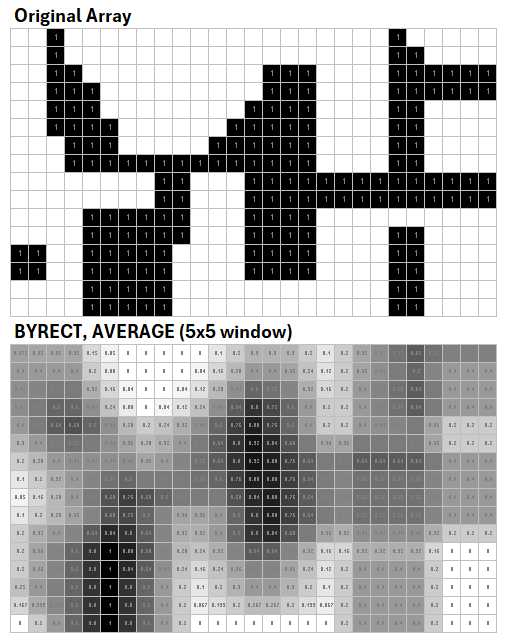
This example also demonstrates that the input to the BYRECT function can be a modified array: IF(array="",0,array). It doesn't need to be a regular range reference, but if the array is very big, it needs to be a reference for the sake of calculation efficiency.
OFFSET-like Window Definition
The parameters were designed to behave like OFFSET. This means that you can use negative values for offsets and negative values for the width and height. It's also important because it allows you to define where the window is located with respect to the current cell.
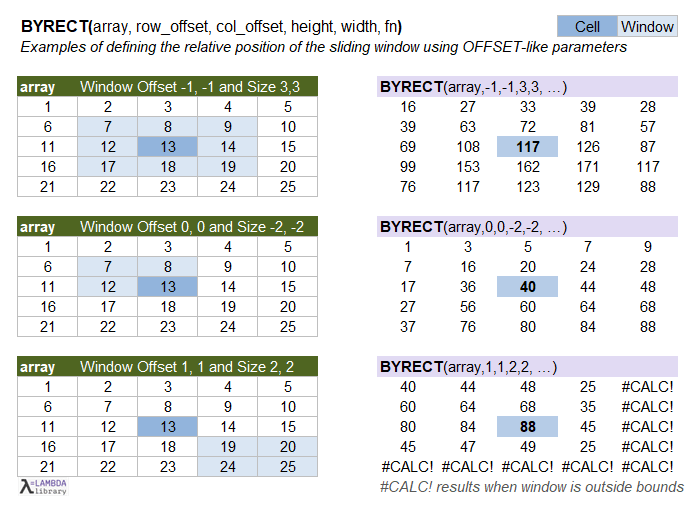
You will likely get #CALC! when the window is completely outside the bounds of the array.
Edge Modes Include Circularity
This is where BYRECT gets interesting. See the acknowledgments below for the story behind it, but essentially it was designed with a lot of flexibility for handling circular edges cases. The image below shows how a 3x3 window works with different edge modes. The window is shown as the light blue cells.
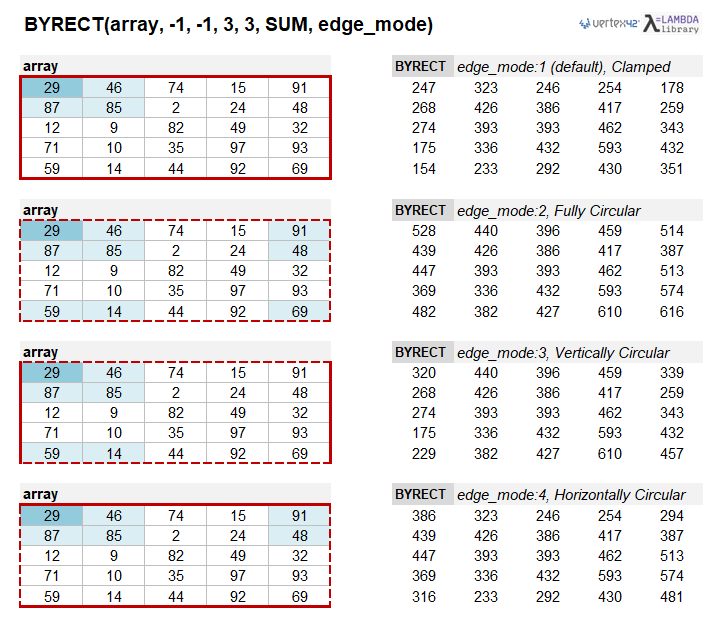
"Truncated" means that the portion of the window outside the array's bounds is truncated, so the subarray passed to the fn function may not be the full window size.
"Circular" means that the window wraps around to the other side of the array. If it helps to have a visual example, a vertically circular array is like printing on a toilet paper roll 🧻. A horizontally circular array is like printing around a can of soda or soup 🥫. A fully circular array is like printing on the entire surface of a donut 🍩 (a torus).
When circular, the array is infinitely circular, so be careful how you specify the height and width parameters.
"Valid" means that values are only returned for full-size windows. The window never overlaps the array boundary. See the BYRECT_VALID function below.
Padded Edge Modes (5,6,7) = Window Size Always HxW
I added the padded edge mode options because with edge_mode=1 (truncated), the size of the window might not be HxW, because it gets truncated when the window overlaps the border. The fully circular option will always use an HxW window size, but edge modes 3 and 4 might not.
Important: The padded edge modes (5,6,7) will pad the values outside the bounds of the array with the pad_with value that you specify, and the window will always be HxW.
Use Cases
I brainstormed with AI to come up with use cases for a function like this. Here is a mixture of my own ideas and ideas from AI:
- Local SUM, AVERAGE, MEDIAN, PERCENTILE - Moving averages, local smoothing, rolling medians
- Local MIN, MAX - Peak detection aids, envelope detection
- Local STDEV, VAR - Volatility measures in grids / images / heatmaps
- Stencil/Kernel Operations - Box blur / mean filter, weighted blur, edge detection
- Finite-difference - Gradient, divergence, 5-pt/9-pt stencils on 2d fields (e.g. temperature, pressure)
- Pattern Matching - compare a window to a pattern and return a similarity score
- Cellular Automata - Game of Life
- Rolling Window Analytics - Rolling average and stdev on time series
- Text/Sequence Manipulation - Cyclic substrings, Sliding n-grams
- Anomaly Detection - A power-up within 10 spaces
Notes about Efficiency
The efficiency of the sliding window algorithm is a challenge! I have tried to optimize BYRECT to be as efficient as possible for very large arrays. This adds to the complexity of the code.
Currently on my machine, if the array is a range reference (very important!), BYRECT can analyze a range as large as 1000x1000 in less than 2 seconds (tested using SUM with a 5x5 window). By "range reference" I mean something like BYRECT(A1:CV100) and not BYRECT(SEQUENCE(100,100)).
Benchmark: BYRECT_OFFSET - In my example file I have a very basic BYRECT_OFFSET lambda function that uses the OFFSET function for the sliding window. This is fast for two main reasons: (1) OFFSET is not performing a lookup on a large array - it only needs to create the window offset from the given cell and (2) It's not doing anything too crazy with edge modes (no circularity). The final array may be large, but it is assembled using MAP or MAKEARRAY which can be pretty fast.
TAKE(DROP()) - Using TAKE(DROP()) with a clearly defined upper-left window location is nearly as fast as using OFFSET. The problem is how to use this technique efficiently with a circular array. UPDATE: The new version of BYRECT uses TAKE(DROP()) when the window fits within the array and uses the other methods only for the edge cases. This resulted in a substantial speed increase.
CHOOSEROWS(CHOOSECOLS()) - Using this method to extract the window, with predefined indices, is the best approach I've found so far that works with circularity. You just need to calculate the correct indices for the window, but you can still reference the original array. Again, using TAKE(DROP()) for the internal windows provides a dramatic improvement in efficiency.
Creating a Padded Array - I have experimented with first creating an array padded with the correct values to handle the various edge modes. While creating the array can be quite fast, the problem is that the new array is stored in memory as an array instead of a range reference. This makes TAKE(DROP()) perform much slower.
There are faster ways of doing a specific analysis, but the goal of the BYRECT function is specifically to allow a LAMBDA function to analyze each individual subarray.
Lambda Formula
This code for using BYRECT in Excel is provided under the License as part of the LAMBDA Library, but to use just this function, you may copy the following code directly into your spreadsheet.
Code to Create Function via the Excel Labs add-in
/**
* BYRECT - Apply a function to each rectangular subarray (sliding window).
*/
/*
* Inputs:
*   array      : Source array or range.
*   row_offset : Row offset of the window start relative to the cell position.
*   col_offset : Column offset of the window start relative to the cell position.
*   win_rows   : Window height (# of rows). Default=1 if blank.
*   win_cols   : Window width (# of columns). Default=1 if blank.
*   fn         : LAMBDA(subarray, expression) returning a scalar.
*   [edge_mode]: Optional (default=1)
*                1 = "truncated" (default) - Window outside array bounds is truncated
*                2 = "circular" - Array is treated as circular (toroidal)
*                3 = "vcirc" - Vertically Circular (truncated otherwise)
*                4 = "hcirc" - Horizontally Circular (truncated otherwise)
*                5 = "padded" - Like truncated, but uses pad_with instead of NA() outside
*                6 = "padded+vcirc"
*                7 = "padded+hcirc"
*   [pad_with] : Optional (default="")
*                Allows you to specify the value to use for portions of the window
*                outside of the array bounds. Typically "" or 0.
* Notes:
*   - Allows the window to be implemented with toroidal and truncated behaviors.
*   - Height and Width can be negative (relative to offset location)
*/
BYRECT = LAMBDA(array,row_offset,col_offset,height,width,fn,[edge_mode],[pad_with],
LET(doc,"https://www.vertex42.com/lambda/byrect.html",
    version,"1/27/2026 BETA - Improved efficiency by using OFFSET for internal windows",
    edge_mode,IF(OR(ISOMITTED(edge_mode),ISBLANK(edge_mode)),1,edge_mode),
    pad_with,IF(ISOMITTED(pad_with),"",pad_with),
    nR,ROWS(array),
    nC,COLUMNS(array),
    h,ABS(height),
    w,ABS(width),
    // A. Precompute window indices
    // Offsets for the UL corner of the window (0-based)
    ul_row_offsets, SEQUENCE(nR,,row_offset,1)-IF(height<0,h-1,0),
    ul_col_offsets, SEQUENCE(nC,,col_offset,1)-IF(width<0,w-1,0),
    // Expand to offset matrices (nR×h, nC×w)
    row_mat_offsets, ul_row_offsets+TRANSPOSE(SEQUENCE(h,,0,1)),
    col_mat_offsets, ul_col_offsets+TRANSPOSE(SEQUENCE(w,,0,1)),

    // B. Apply edge handling to index arrays
    // Helpers convert offsets (os) to 1-based indices
    fn_WRAP,  LAMBDA(os,n,MOD(os, n)+1),
    fn_TRUNC, LAMBDA(os,n,IF( (os<0)+(os>n-1), NA(), os+1) ),
    // Handle edge_mode cases using thunked SWITCH to avoid
    // calculating unused switch cases
    row_mat, SWITCH(edge_mode,
        1, LAMBDA( fn_TRUNC(row_mat_offsets,nR) ),
        2, LAMBDA( fn_WRAP(row_mat_offsets,nR) ),
        3, LAMBDA( fn_WRAP(row_mat_offsets,nR) ),
        4, LAMBDA( fn_TRUNC(row_mat_offsets,nR) ),
        5, LAMBDA( fn_TRUNC(row_mat_offsets,nR) ),
        6, LAMBDA( fn_WRAP(row_mat_offsets,nR) ),
        7, LAMBDA( fn_TRUNC(row_mat_offsets,nR) ),
        LAMBDA( "INVALID" )
    )(),
    col_mat, SWITCH(edge_mode,
        1, LAMBDA( fn_TRUNC(col_mat_offsets,nC) ),
        2, LAMBDA( fn_WRAP(col_mat_offsets,nC) ),
        3, LAMBDA( fn_TRUNC(col_mat_offsets,nC) ),
        4, LAMBDA( fn_WRAP(col_mat_offsets,nC) ),
        5, LAMBDA( fn_TRUNC(col_mat_offsets,nC) ),
        6, LAMBDA( fn_TRUNC(col_mat_offsets,nC) ),
        7, LAMBDA( fn_WRAP(col_mat_offsets,nC) ),
        LAMBDA( "INVALID" )
    )(),
    // C. Calculate the Internal Window TF Matrix
    // Constant UL offsets relative to the anchor cell
    ul_r_off, row_offset-IF(height<0,h-1,0),
    ul_c_off, col_offset-IF(width<0,w-1,0),
    // Internal-window mask (TRUE where full hxw fits inside bounds)
    top_vec,  SEQUENCE(nR,,1,1) + ul_r_off,
    left_vec, SEQUENCE(1,nC,1,1) + ul_c_off,
    row_ok, (top_vec>=1) * (top_vec<=nR-h+1),
    col_ok, (left_vec>=1) * (left_vec<=nC-w+1),
    // nRxnC TRUE where both row_ok and col_ok are TRUE
    internal_tf,
        MMULT(row_ok, SEQUENCE(1,nC,1,0)) *
        MMULT(SEQUENCE(nR,1,1,0), col_ok),
    iMat, LAMBDA( MMULT(SEQUENCE(nR),SEQUENCE(,nC,1,0)) ),
    jMat, LAMBDA( MMULT(SEQUENCE(nR,1,1,0),SEQUENCE(,nC,1,1)) ),
    // D. Sliding Window Loop
    final,
    // Truncated Mode, using TAKE(DROP()) Errors when window is completely outside array.
    IF( edge_mode=1,
        LET(
        first_row, BYROW(row_mat,LAMBDA(r,TAKE(TOCOL(r,2),1))),
        win_rows, BYROW(row_mat,LAMBDA(r,ROWS(TOCOL(r,2)))),
        first_col, BYROW(col_mat,LAMBDA(r,TAKE(TOCOL(r,2),1))),
        win_cols, BYROW(col_mat,LAMBDA(r,ROWS(TOCOL(r,2)))),
        MAP(array,iMat(),jMat(),internal_tf,LAMBDA(cell,i,j,tf,
            fn(
            IF( AND(ISREF(array), tf),
                // Fast internal case: OFFSET on a reference cell
                // OFFSET(cell, ul_r_off, ul_c_off, h, w),
                TAKE( DROP(array,i+ul_r_off-1,j+ul_c_off-1),h,w),
                // Fallback to original method
                LET(fr,@INDEX(first_row,i,1),h,@INDEX(win_rows,i,1),
                    fc,@INDEX(first_col,j,1),w,@INDEX(win_cols,j,1),
                    TAKE( DROP(array,fr-1,fc-1), h, w)
                )
            )
            )
        ))
        ),
    // For circularity, use CHOOSECOLS(CHOOSEROWS())
    // TOCOL removes NA() from index vectors
    IF( ISNUMBER(XMATCH(edge_mode,{2,3,4})),
        MAP(array,iMat(),jMat(),internal_tf,LAMBDA(cell,i,j,tf,
            fn(
            IF( AND(ISREF(array), tf),
                // Fast internal case: OFFSET on a reference cell
                // OFFSET(cell, ul_r_off, ul_c_off, h, w),
                TAKE( DROP(array,i+ul_r_off-1,j+ul_c_off-1),h,w),
                // Fallback to original method
                CHOOSECOLS(
                CHOOSEROWS(array,TOCOL(INDEX(row_mat,i,),2)),
                TOCOL(INDEX(col_mat,j,),2)
                )
            ))
        )),
    // "pad" mode builds window index arrays then uses IFNA to replace
    // index errors with pad_with value. Allows window to be outside array.
    IF( OR(edge_mode=5,edge_mode=6,edge_mode=7),
        MAP(array,iMat(),jMat(),internal_tf,LAMBDA(cell,i,j,tf,
            fn(
            IF( AND(ISREF(array), tf),
                // Fast internal case: OFFSET on a reference cell
                // OFFSET(cell, ul_r_off, ul_c_off, h, w),
                TAKE( DROP(array,i+ul_r_off-1,j+ul_c_off-1),h,w),
                // Fallback to original method
                LET(
                winrows,CHOOSECOLS(TOCOL(INDEX(row_mat,i,)),SEQUENCE(width,1,1,0)),
                wincols,CHOOSEROWS(TOROW(INDEX(col_mat,j,)),SEQUENCE(height,1,1,0)),
                IFNA(INDEX(array,winrows,wincols),pad_with)
            ))
        ))
    ),
        "edge_mode not supported (1=trunc,2=circ,3=vcirc,4=hcirc,5=pad,6=vcirc+pad,7=hcirc+pad)"
    ))),
    final
));
BYRECT_VALID(array,height,width,fn)
This version of BYRECT slides a HxW window only within the array and never overlaps the edge (so edge_mode does not apply). This leads to a much simpler algorithm that is also very efficient. The window is always HxW, but the output array will be smaller than the original array. "Valid" refers to "valid convolution" where no part of the window hangs over the edge of the array.
▼ Show BYRECT_VALID
CONVOLVE2D(array,kernel,[reverse])
2D Convolution is the operation of sliding a kernel over an array and, at each position, returning the sum of the element-wise products of the window and the kernel, with optional kernel reversal (not reversed by default). Reversing flips the kernel LR and UD.
Convolution is essentially a more specific operation than the general BYRECT function. And "Valid Convolution" is more specific still - it indicates that the window always fits within the array and does not ever extend beyond the boundary.
▼ Show CONVOLVE2D()
FFT (Fast Fourier Transform)
How does BYRECT relate to FFT (Fast Fourier Transform)? Well, FFT is what you use when the window operation is 2D convolution as defined above with a reversed kernel (sums of element-wise products). You would use it when you need something faster than BYRECT or CONVOLVE2D. BYRECT is a more generalized sliding window function.
With the data size N and kernel size K, CONVOLVE2D is essentially O(NxK). FFT changes the cost model to O(N LOG N).
You would need FFT when convolution becomes significantly cheaper than direct sliding windows. So if you have a large array with a large kernel, and CONVOLVE2D is not sufficient, then FFT may be the answer. I may work on that task if I run into a need - but this may be something we wait for Excel to implement as an optimized built-in function.
Acknowledgements
Here is the story of BYRECT. After the 2025 MEWC event in December, I started working on a window function to act as kind of an advanced "MID" for arrays, an extension of my SLICE lambda with OFFSET-like inputs. While watching a walk-through by Diarmuid Early of the 2025 MEWC final case Origami, I heard him say he had a BYRECT lambda and 💡! Something like BYRECT has so many uses in real-life, not just Excel Esports. Thanks to Diarmuid Early, Peter Bartholomew, Erik Oehm, Jeremy Freelove, and others for their feedback, suggestions and ideas!
See Also
- SciPy: convolve2d, Matlab: conv2, NumPy: sliding_window_view

Follow Us On ...