MASK + Related Functions
=MASK(mask_type, [distance],[include_anchor])
| Argument | Description | Example |
|---|---|---|
| mask_type | One of a variety of shapes for common masks | "square" |
| [size] | Default=1. For some mask types, allows you to specify the size of the mask | 1 |
| [include_anchor] | Default=FALSE, TRUE|FALSE for whether to include [0,0] in the mask | FALSE |
Description
The MASK function creates an array of Row Offsets and Column Offsets for a variety of different shapes. MASK is mainly a helper function designed to quickly generate inputs for some other functions such as OffsetByAddress or GetAdjAddresses.
The use for MASK mainly arises from Excel Esport cases where you may be asked to do some analysis of surrounding cells. While the MASK function may not be vitally important, knowing how to work with OFFSET to select surrounding cells IS an important Esport skill.
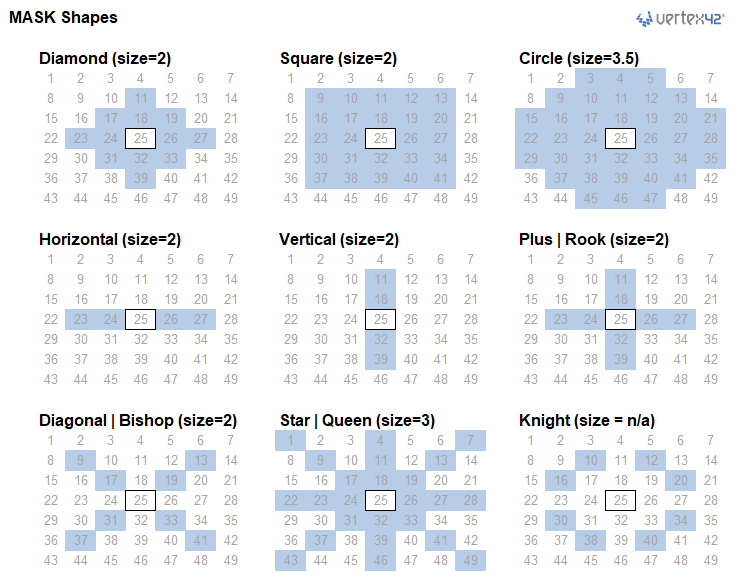
The example file below contains the MASK lambda set up to show visually what each mask looks like.
⤓ Get the Example File (Filename: mask-example.xlsx)
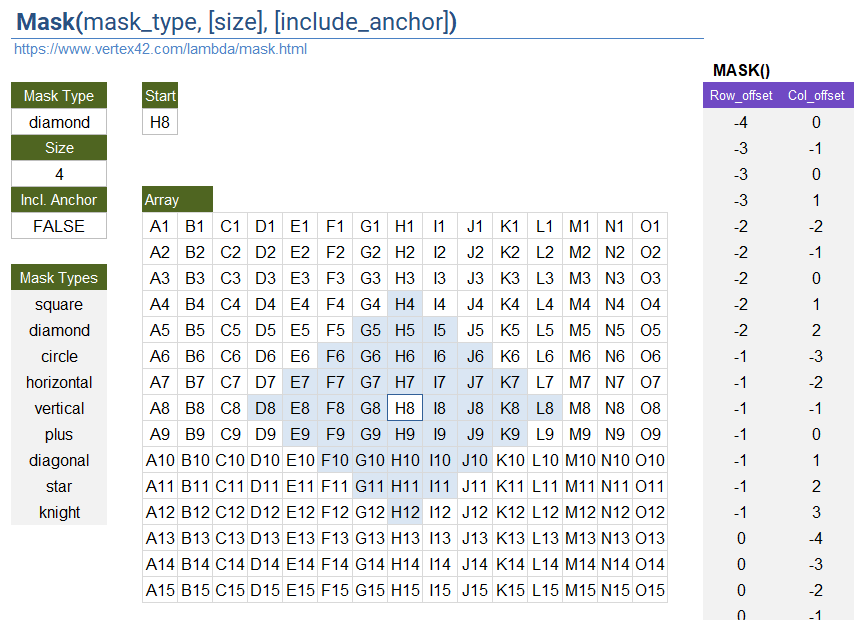
Related Functions on This Page
- MaskX(array,row_index,[col_index],[mask_offsets],[edge_mode],[pad_with]) :: Extract values from an array based on an anchor location and mask offsets, with optional edge modes.
- MaskFromSelection(ref,[rng_1],[rng_2],...,[rng_24]) :: Create an array of Row|Col offsets based on multi-area selection.
- OffsetByMask(ref,mask_offsets,[dist],[incl_anchor]) :: Uses OFFSET in a loop for each offset defined by MASK(...).
- AddressToMask(anchor_address, addresses) :: Convert an array of text-based addresses (e.g. {"A1","B1"} or "A1:B3") to an array of row|col offsets based on a reference address (e.g. "H8").
- MaskToRC(mask_offsets,[rowmult]) :: Convert row|col offsets to integer-encoded RC offsets
Examples
=LET(
  off, MASK("diag",1),
  OffsetByAddress( "C5", TAKE(off,,1), TAKE(off,,-1) )
)
Result: {"B4";"D4";"B6";"D6"}
You can also use GetAdjAddresses, leaving map_array and valid_value blank. If you include map_array, then locations beyond the boundary of the array will be excluded from the result.
=GetAdjAddresses("C5",,,MASK("diag"))
Result: {"B4";"D4";"B6";"D6"}
You can use IndexByAddress to return the values from an array based on these offset addresses.
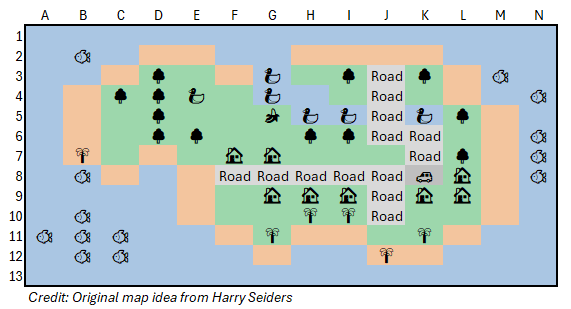
=GetAdjAddresses("K8", map_array, "Road", MASK("square") )
Result: {"K7";"J8"}
=MaskX(A1:N13, "K8", , MASK("diag") )
Result: {0;"🌳";"Road";"🏠"}
MASK Lambda Formula
This code for using MASK in Excel is provided under the License as part of the LAMBDA Library, but to use just this function, you may copy the following code directly into your spreadsheet.
Code to Create Function via the Excel Labs add-in
/**
* MASK - Defines a 2-Column array of row|col offsets based on mask type:
* "h|horizontal","v|vertical","plus|rook","circle","knight","l","r","u","d",
* "square|all|neighbors|king","diamond|ortho","diag|bishop","star|queen",
*/
/*
* Inputs:
*   mask_type : square(default)|diamond|circle|horiz|vert|plus|diag|star|knight
*               left|right|up|down|ul|ur|ll|lr
*   [size]    : size of the mask. Default=1
*   [include_anchor] : Default=FALSE. If true include 0,0.
* Notes:
*   - "circle" is euclidean center-to-center <= size
*   - Uses thunks for improved efficiency
*/
MASK = LAMBDA([mask_type],[size],[include_anchor],
IF(ISOMITTED(mask_type),"Masks: square,diamond,diag,circle,horiz,vert,plus,star,knight",
LET(doc,"https://www.vertex42.com/lambda/mask.html",
    version,"2/7/26 - Included all 8 individual directions",
    mask_type, IF(ISOMITTED(mask_type), "all", mask_type),
    size, IF(OR(ISOMITTED(size),ISBLANK(size)), 1, size),
    incl_anchor, IF(ISOMITTED(include_anchor), FALSE, include_anchor),
    d,TRUNC(size),
    k,SEQUENCE(d),
    th_diag,LAMBDA( VSTACK(
            HSTACK(-k,-k),HSTACK(-k, k),
            HSTACK( k,-k),HSTACK( k, k)
    )),
    th_square,LAMBDA(
        LET(
            n, 2*d+1,
            rVec, TOCOL(MMULT(SEQUENCE(n,,-d,1),SEQUENCE(1,n,1,0))),
            cVec, TOCOL(MMULT(SEQUENCE(n,1,1,0),SEQUENCE(,n,-d,1))),
            pairs, HSTACK(rVec, cVec),
            FILTER(pairs, (rVec<>0) + (cVec<>0))
        )
    ),
    th_diamond,LAMBDA(
        LET(n, 2*d+1,
            rVec, TOCOL(MMULT(SEQUENCE(n,,-d,1),SEQUENCE(1,n,1,0))),
            cVec, TOCOL(MMULT(SEQUENCE(n,1,1,0),SEQUENCE(,n,-d,1))),
            pairs, HSTACK(rVec, cVec),
            FILTER(pairs, ((ABS(rVec)+ABS(cVec))<=size) * ((rVec<>0) + (cVec<>0)))
        )
    ),
    th_horiz,LAMBDA( HSTACK(SEQUENCE(2*d,1,0,0),VSTACK(-k,k)) ),
    th_vert,LAMBDA( HSTACK(VSTACK(-k,k),SEQUENCE(2*d,1,0,0)) ),
    th_u,LAMBDA( HSTACK(-k,SEQUENCE(d,1,0,0)) ),
    th_d,LAMBDA( HSTACK( k,SEQUENCE(d,1,0,0)) ),
    th_l,LAMBDA( HSTACK(SEQUENCE(d,1,0,0),-k) ),
    th_r,LAMBDA( HSTACK(SEQUENCE(d,1,0,0), k) ),
    th_lrud,LAMBDA( VSTACK(
            HSTACK(SEQUENCE(2*d,1,0,0),VSTACK(-k,k)),
            HSTACK(VSTACK(-k,k),SEQUENCE(2*d,1,0,0))
    )),
    th_star,LAMBDA(
        VSTACK(
            HSTACK(SEQUENCE(2*d,1,0,0),VSTACK(-k,k)),
            HSTACK(VSTACK(-k,k),SEQUENCE(2*d,1,0,0)),
            HSTACK(-k,-k),HSTACK(-k, k),
            HSTACK( k,-k),HSTACK( k, k)
        )
    ),
    mt,IF( TYPE(mask_type)=64, mask_type,
    SWITCH(mask_type,
        "horizontal",LAMBDA( th_horiz() ),
            "h",LAMBDA( th_horiz() ),
            "horiz",LAMBDA( th_horiz() ),
        "left",LAMBDA( th_l() ),"l",LAMBDA( th_l() ),
        "right",LAMBDA( th_r() ),"r",LAMBDA( th_r() ),
        "up",LAMBDA( th_u() ),"u",LAMBDA( th_u() ),
        "down",LAMBDA( th_d() ),"d",LAMBDA( th_d() ),
        "ul",LAMBDA( HSTACK(-k,-k) ),
        "ur",LAMBDA( HSTACK(-k, k) ),
        "ll",LAMBDA( HSTACK( k,-k) ),
        "lr",LAMBDA( HSTACK( k, k) ),
        "vertical",LAMBDA( th_vert() ),
            "v",LAMBDA( th_vert() ),
            "vert",LAMBDA( th_vert() ),
        "plus",LAMBDA( th_lrud() ),
            "rook",LAMBDA( th_lrud() ),
        "diamond",LAMBDA( th_diamond() ),
            "ortho",LAMBDA( th_diamond() ),
        "diagonal",LAMBDA( th_diag() ),
            "diag",LAMBDA( th_diag() ),
            "bishop",LAMBDA( th_diag() ),
        "square",LAMBDA( th_square() ),
            "all",LAMBDA( th_square() ),
            "neighbors",LAMBDA( th_square() ),
            "king",LAMBDA( th_square() ),
        "star",LAMBDA( th_star() ),
            "queen",LAMBDA( th_star() ),
        "circle",LAMBDA(
            LET(
                n, 2*d+1,
                rVec, TOCOL(MMULT(SEQUENCE(n,,-d,1),SEQUENCE(1,n,1,0))),
                cVec, TOCOL(MMULT(SEQUENCE(n,1,1,0),SEQUENCE(,n,-d,1))),
                pairs, HSTACK(rVec, cVec),
                FILTER(pairs, ((rVec<>0) + (cVec<>0)) * (size>=SQRT(rVec^2+cVec^2)) )
            )
        ),
        "knight",LAMBDA(
            {-1,-2;-2,-1;-2,1;-1,2;1,2;2,1;2,-1;1,-2}
        ),
        "unhandled"
    )),
    IF(include_anchor,
        VSTACK(HSTACK(0,0),mt()),
        mt()
    )
)));
OffsetByMask()
=OffsetByMask(ref, mask_offsets, [size], [include_anchor])
OFFSET(ref,row_offsets,col_offsets) allows you to use arrays for the row_offsets and col_offsets, but returns #VALUE! unless you wrap the result with a function like SUM. See the article by Fredson Alves Pinho in the references below for info about that.
B4:D6 = {
  1 ,2 ,3 ;
  11,12,13;
  21,22,23 }

=LET(
    row_offsets, {-1;-1; 0},
    col_offsets, {-1; 0;-1},
    OFFSET(C5, row_offsets, col_offsets)
)

Result: {#VALUE!;#VALUE!;#VALUE!}
OffsetByMask(ref,mask_offsets) is essentially doing OFFSET(ref,row_offsets,col_offsets) one set of offsets at a time, returning values instead of #CALC!.
B4:D6 = {
  1 ,2 ,3 ;
  11,12,13;
  21,22,23 }

=LET(
    mask_offsets, {-1,-1;-1,0;0,-1},
    OffsetByMask(C5,mask_offsets)
)

Result: {1;2;11}
▼ Show OffsetByMask()
MaskX()
=MaskX(array, row_index, [col_index], [mask_offsets], [edge_mode], [pad_with])
MaskX eXtracts values from an array based on an anchor location (defined by row_index, col_index) and an array of mask_offsets.
The main purpose of MaskX is to handle edge modes. The default behavior (edge_mode=1) removes offsets that would result in out-of-bound references. See the BYRECT function for a description of circularity.
=LET(
    text, "CDEFGAB",
    array, REGEXEXTRACT(text,"\X",1),
    themask, MASK("left",20,TRUE),
    edge_mode, 2,
    CONCAT( MaskX(array,1,3,themask,edge_mode) )
)
Result: "EDCBAGFEDCBAGFEDCBAGF"
▼ Show MaskX()
MaskFromSelection()
=MaskFromSelection(anchor_ref, [rng_01], [rng_02], ..., [rng_24])
This function is essentially just a convenient way of creating an array of MASK offsets by quickly selecting specific cells relative to an anchor. First, select the anchor cell, then hold CTRL as you select all of the other cells or ranges.
=MaskFromSelection(B2, A1:A3, B1, C1:C3, B3)

Result: {-1,-1;0,-1;1,-1;-1,0;-1,1;0,1;1,1;1,0}
To include the anchor as one of the offsets, select it a second time. Overlapping ranges will result in duplicate offsets.
▼ Show MaskFromSelection()
AddressToMask()
=AddressToMask(anchor_address, addresses)
This just another way of creating an array of mask offsets from a list of addresses and an anchor address.
=AddressToMask("C5","B4:B6")
=AddressToMask("C5",{"B4";"B5";"B6"})

Result: {
  -1, -1;
   0, -1;
   1, -1
}
▼ Show AddressToMask()
MaskToRC()
=MaskToRC(offsets, [rowmult])
Many Excel Esport competitors like to use integer-encoded cell references, so this function converts the array generated by MASK to integer-encoded RC offsets, with rowmult=1E6 by default.
=MaskToRC( MASK("square") )

Result: {-1000001;-1000000;-999999;-1;1;999999;1000000;1000001}
▼ Show MaskToRC()
See Also
Address Functions, Map Functions
- Cell-Level Thunks in Excel Using #VALUE Arrays for Range-Reference Encapsulation - by Fredson Alves Pinho. This article explains how you can use OFFSET with arrays as the row_offsets and col_offsets.

Follow Us On ...