Round Robin 2v2 Generator
This workbook helps you generate match-ups for a 2-v-2 round robin tournament. I designed it for pickleball tournaments, but it works for other sports, too. It creates a set of games where each player teams up with every other player one time. The game match-ups can be drawn by chance or you can select the option that balances the games by matching abilities.
Round Robin 2v2 Tournament Generator
for Excel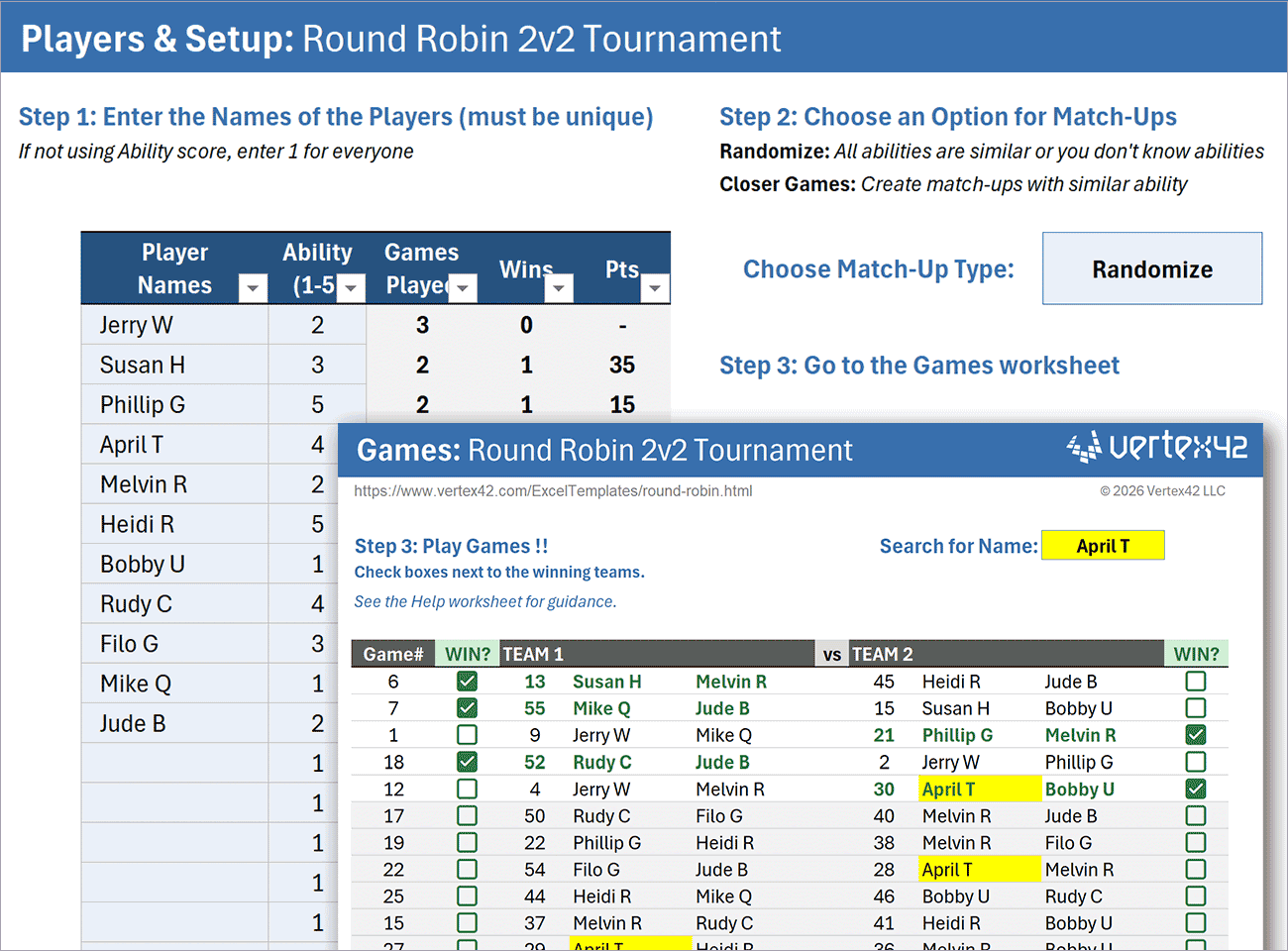
Download
⤓ ExcelLicense: Private Use (not for distribution or resale)
IMPORTANT: This file requires Microsoft 365 because it incorporates advanced dynamic array formulas, checkboxes, and custom lambda functions, all designed to simplify your experience (without needing to construct it yourself).
Using the Round Robin Tournament Template
STEP 1 - Enter the Names of the Players
You can update the player list before the games start. This allows for last-minute changes, like if someone doesn't show up. After you start playing games and marking wins, do not change the player list.
Player Ability (1-5): If player abilities are very different, you may want to use a weighted ability ranking and choose the Closer Games option to create match-ups that result in more games against opponents with similar ability. Rank player ability (1=low, 5=high) based on your particular group of players.
STEP 2 - Choose whether to Randomize or make Closer Games
Choose Randomize when all players have similar abilities, or you don't know their abilities. The Closer Games option generates match-ups using player ability ratings to help create more balanced games.
STEP 3 - Create Match-ups (Automated)
The spreadsheet automatically generates match-ups. You may view the Matchups worksheet to see how they are created or adjust the random seeds if desired. No manual editing is required.
Closer Games Algorithm: Here is how the algorithm works when choosing Closer Games:
- Each team is assigned a weighted ability score equal to the sum of the abilities of its two players.
- Teams are sorted in ascending order by this weighted ability score.
- Match-ups are created by selecting the first unassigned team (lowest ability first), pairing it with the next available unassigned team, and repeating until all teams have played once.
Note: An odd number of teams will result in at least one BYE. Sometimes, especially if you do not randomize, you could end up with more than one BYE just based on how the algorithm works.
STEP 4 - Play Games
The Games worksheet lists all of the game match-ups along with columns for marking which team wins.
Choosing a Game to Play:
Due to factors such as the number of players, number of courts, and the need for breaks, the tournament manager decides which games to play at any given time.
Games are randomized to help distribute rest periods more evenly.
General guidance:
- Start with the first game in the list.
- Identify which players are currently available.
- Select a game involving players who are not already playing.
- Prioritize players who have been waiting the longest.
Search for Name: The Search field at the top of the Games worksheet allows you to highlight all games involving a specific player.
STEP 5 - Scoring
Determining an ultimate winner of a round robin tournament can be complicated, and may not be the main reason for holding the tournament.
This workbook uses a weighted scoring system based on (a) Number of games played and (b) Weighted ability of opponent defeated.
Pts = SUM( WeightedAbilityOfOpponent ) * 10 / Games Played
If the Ability of each player is set to 1, then formula simplifies to Pts=Wins*20/Games

Follow Us On ...