QR Code Generator
This QR Code generator was originally created as a basic example of how to use the PY() function in Excel. However, the Python qrcode library is actually quite powerful and includes many customization options. This makes the Excel template useful for those who may not have the technical knowledge required to use Python in other environments.
Python QR Code Generator Template
in Excel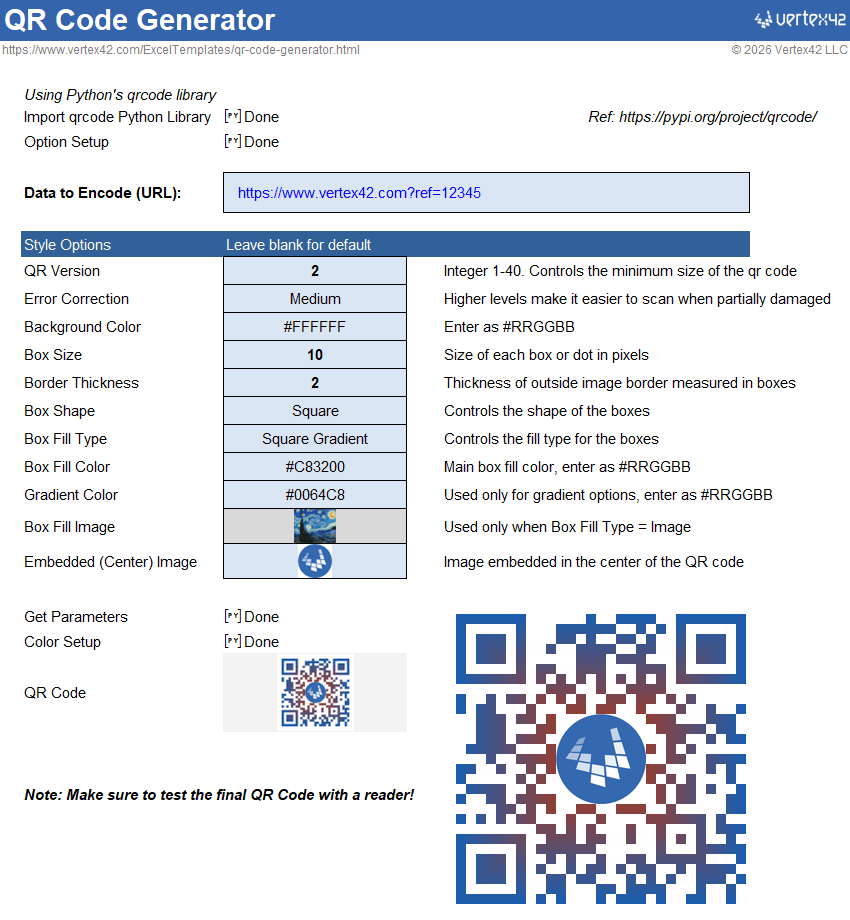
Download
⤓ Excel (.xlsx)License: Private Use (not for distribution or resale)
Authors: Josh Wittwer and Jon Wittwer
The Basic QR Code
Creating a basic QR code using Python in Excel is extremely simple. It merely requires importing the qrcode library and then using a simple formula.
(1) Place the following formula in a cell somewhere near the top of the worksheet.
=PY( import qrcode )
The cell containing this formula should be in a row above the cells where you create your QR codes. This lets the rest of the sheet use new functions from the Python qrcode library.
(2) Assuming the data you want to encode (such as a url) is located in cell C7, the following formula is the only other thing you need to create the QR code. Put this formula into any row below the one where you imported the qrcode library.
=PY( qrcode.make(xl("C7")).show() )
Note: When you finish editing a PY() function in Excel, you need to press Ctrl+Enter (because Enter will just create a new line within the formula).
(3) Change the [PY] output to an Image.
If you see "[PY]Image" within a cell instead of the actual image, you can right-click on the cell and under the "Python Output" menu select "Excel Value" (or press Ctrl+Alt+Shift+M).
To display the QR code outside of its cell, right-click on the cell and select "Display Plot Over Cells". The image can then be resized, cropped, and reshaped
Advanced QR Code Generator
The advanced QR Code generator worksheet uses many of the available options in the Python qrcode library. It is a useful example of how to use Excel to control the inputs for Python code. To learn how it works, download the template and work through it line by line.
References and Resources
- Python qrcode Library at pypi.org - A description of the qrcode Library for Python.
- QR Codes in a Spreadsheet at quickchart.io - Documentation for using the IMAGE function to create QR codes in Excel or Google Sheets.
IMAGE Alternative for Generating a QR Code
Derek Henry on LinkedIn told me about a method for generating QR codes using the IMAGE function and the image generator from quickchart.io. See the documentation for the QR Code API (quickchart.io). Here is a quick example:
=LET(
    text, "https://www.vertex42.com",
    size, 150,
    color, "7B7B7B",
    background, "ffffff",
    margin, 2,
    IMAGE("https://quickchart.io/qr?text=" & ENCODEURL(text) &
      "&size=" & size & "&dark=" & color & "&margin=" & margin &
      "&light=" & background )
)


Follow Us On ...