Board Game Collection Tracker
As avid board gamers, we have quite the collections of board games, card games, dice games, and everything in between. When your collection increases in size, you can start to forget all the games you have, get stuck in a rut playing the same game, or maybe even forget about a game you haven't played yet. This spreadsheet lets us customize and control the information we want to track.
This game collection tracker started out as a simple inventory. Then we took things to the next level by making it easy to use, fun to fill out, and even including a fun way to choose a game to play for your next game night. You can access and edit it on your mobile device just like any other Google Sheet.
Board Game Collection Tracker
for Google Sheets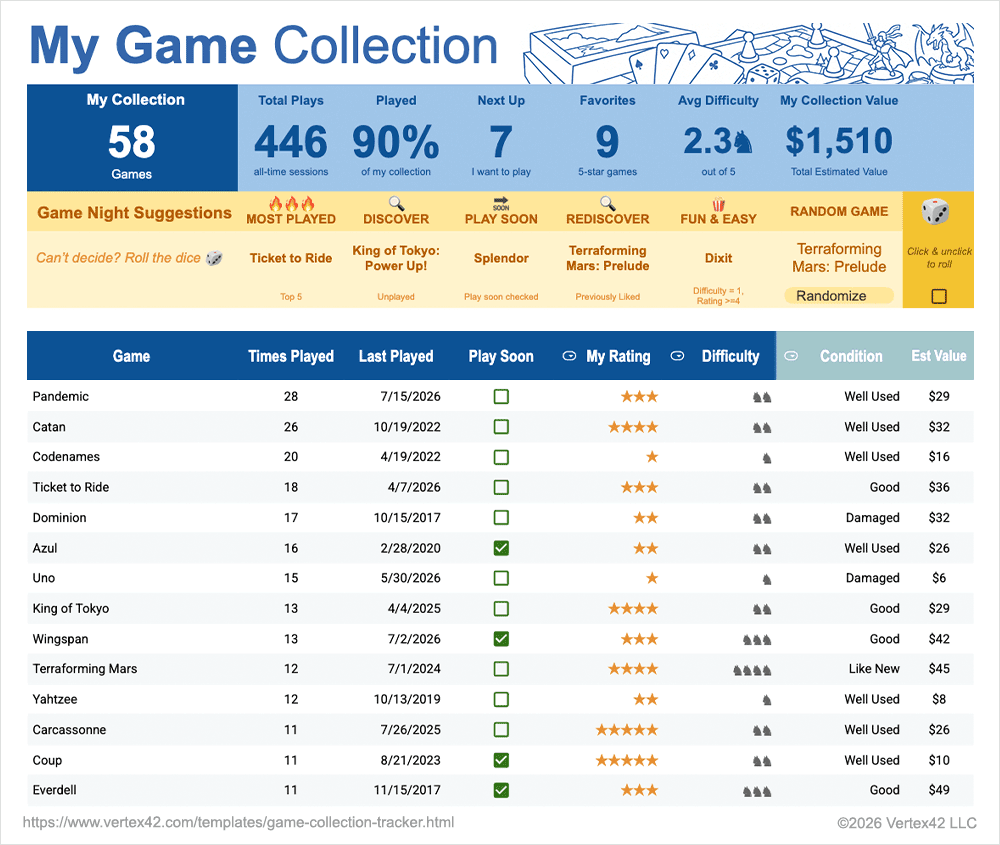
Download
⤓ Google SheetsLicense: Private Use (not for distribution or resale)
Authors: Jim Wittwer & Jon Wittwer
Description
Keep track of useful game information: You can start by simply including the names of all your games, and then to help you with filtering and sorting, you can enter more info, including:
- 🎲 Times you've played the game
- ⌛ When you last played
- ✅ If you want to play it soon
- ⭐ Your rating (1 to 5 ★)
- ♞ How difficult the game is (1 to 5 ♞)
You can also list other aspects of the games that help with game selection including, Game Type (Board, Card, Dice, etc), Player Count, and Play Time. To track even more info, just add new columns of your own.
The final set of columns in the board game list is for tracking the Condition and Value of your games. This can be useful if you trade or sell games, or if you just want to be shocked at how much you've spent over the years.
Fun Bonus Features
Collection Highlight Dashboard
The dashboard we've designed is a fun way to see highlights about your collection as you fill in the list. How many games are in your collection? How many times have you played them? How many games have you given 5 stars? What is the total $ value?

Test Your Knowledge
To make filling in your game list a little more fun, we've included a section at the top that lets you take a guess at how many games you own (before finishing your game inventory). Enter your guesses for how many times you've played, how many games you think you'll rate with 5 stars, and even what you think the total value of your collection is. Then, as you fill out the spreadsheet you'll see how close your guesses are.

Game Night Suggestions
This is one of our favorite features - game suggestions for your next game night. This section randomly chooses a game from your collection based on a variety of filters. Here are a couple examples:
- Most Played: Randomly chooses a game from the top 5 games you've most played
- Fun & Easy: Randomly chooses a game you've marked as easy to play (1♞) that also has a 4⭐ or 5⭐ rating
- Hidden Gem: Suggests a game that you've played less than 5 times but also has a 4⭐ or 5⭐ rating

Table Filter Views
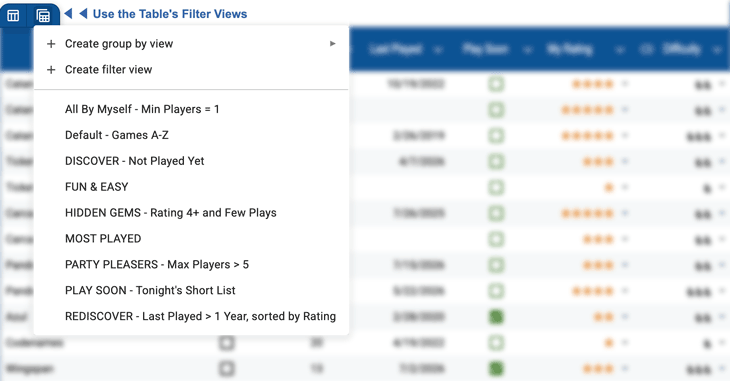
Google Sheets allows you to create and save filtered views of your data, so we've made a variety of views to help you browse your collection. Similar to our game night suggestion section, you can choose from our premade filter views. For example, see what games you've not played yet, what games allow you to play solo, or simply organize all your games from A to Z.


Follow Us On ...