Depreciation Calculator
In Part 1 (Depreciation Schedule) and Part 2 (MACRS Depreciation Rate) of this Depreciation in Excel series, I discussed basic depreciation methods for financial reporting as well as how to calculate the depreciation rate used in MACRS tables. In this final part of series, you can download a Depreciation Calculator that implements all the methods discussed in these previous articles, including straight-line depreciation, sum-of-years' digits, and declining-balance.
Depreciation Calculator
for Excel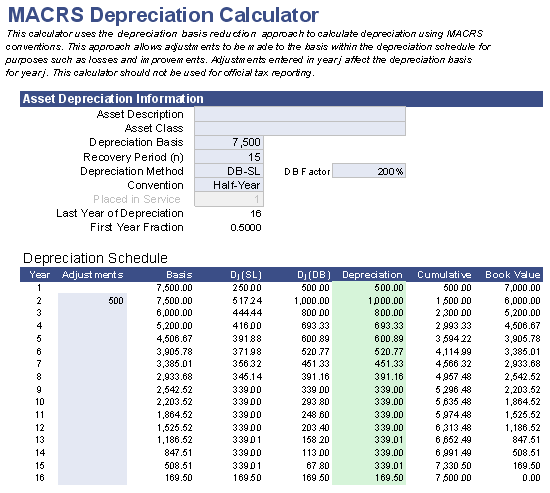
Download
⤓ Excel (.xlsx)Other Versions
License: Private Use (not for distribution or resale)
"No installation, no macros - just a simple spreadsheet" - by Jon Wittwer
Description
This Depreciation Calculator spreadsheet was designed to demonstrate how to perform various depreciation calculations for a variety of depreciation methods. It is not intended to be used for official financial or tax reporting purposes.
The workbook contains 3 worksheets:
1. Basic Depreciation Calculator: This calculator uses the same formulas used in the Depreciation Schedule, where depreciation is calculated without using the MACRS half-year, mid-quarter, or mid-month conventions.
2. MACRS Depreciation Rate Calculator: This depreciation calculator uses the approach I discussed in Part 2, where the depreciation rate is calculated instead of looking up the rates in the MACRS tables.
3. MACRS Depreciation Calculator: This calculator uses what I refer to as the "Depreciation Basis Reduction" approach. I wouldn't call it an "official" MACRS depreciation calculator, but it is set up to work as outlined in the IRS publication (see "Figuring the Deduction Without Using the Tables"). It allows adjustments to be made to the depreciation basis due to losses or improvements.
Before using the MACRS depreciation calculators, you should read through How to Depreciate Property: IRS Publication 946.
Using the Depreciation Calculator
Before using the depreciation calculator, please refer to the previous articles which explain the formulas and various depreciation methods:
- Part 1: Depreciation Methods and Formulas for Financial Reporting in Excel
- Part 2: How to Calculate the Depreciation Rate in the MACRS Tables Using Excel
Each of the 3 worksheets in the depreciation calculator workbook creates a depreciation schedule showing the depreciation allowance for the year j (Dj), the accumulated depreciation, and the book value at the end of the year (BVj).
Important: The straight-line depreciation (SL) and declining-balance depreciation (DB) methods used in the MACRS depreciation calculators are different than those in the Basic Depreciation Calculator due to the use of the half-year, mid-quarter, and mid-month conventions.
Depreciation Calculation Resources
- How to Depreciate Property, IRS Publication 946 at IRS.gov.