Business Budget Template
Having a business budget is essential for any size business. A business budget helps you decide whether you can grow your business, give yourself a raise, purchase additional inventory and assets, and whether you may be able to avoid bankruptcy.
It's possible to modify a personal budget spreadsheet to apply to a business, but if you are using our Income Statement Template, you'll want to use the business budget spreadsheet so that you can create a budget that is parallel to your income statement.
For those who are just starting a business, or thinking of starting a business, you might be interested in the free Business Start Up Costs template. A startup cost analysis is an important part of a good business plan and can help you get things off the ground before you begin using a more detailed business budget.
Business Budget Template
for Excel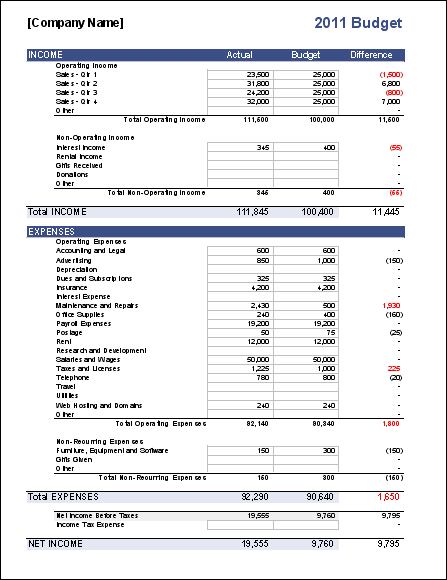
Download
⤓ Excel (.xlsx)License: Private Use (not for distribution or resale)
Description
This spreadsheet contains two sample business budgets designed for companies providing services or selling products.
Service Providers: The Services worksheet is a simple business budget that separates income and business expenses into categories that closely match those used in an income statement. The categories are fairly comprehensive, but it is also easy to add, remove, and modify the categories.
Retailers, Manufacturers, Publishers: The Goods worksheet includes the categories in the Services worksheet, but also has a Cost of Goods Sold section for recording inventory and purchases and calculating Gross Profit.
12-Month Business Budget
for Excel and Google Sheets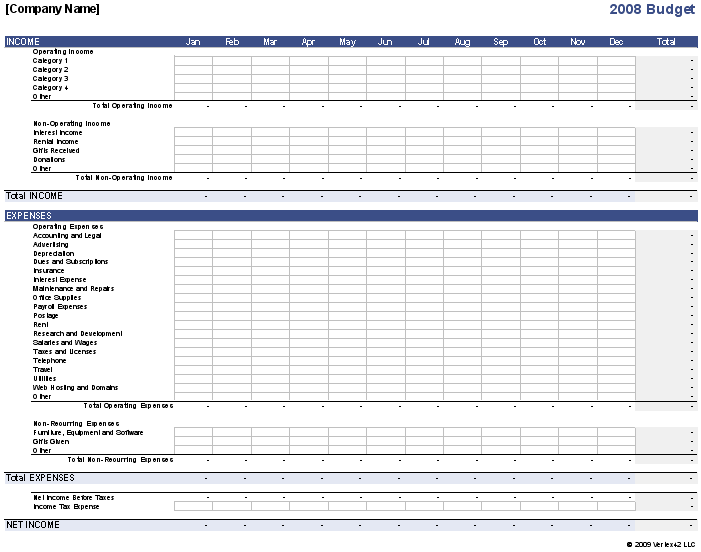
Description
This worksheet is a variant of the above business budget, with sales and business expenses broken down by month. This is helpful for budgeting quarterly expenses and other business expenses that occur at specific times of the year.
The Goods worksheet lets you record sales and cost of goods sold for multiple products.
License: Private Use (not for distribution or resale)
Business Budget for Multiple Products
for Excel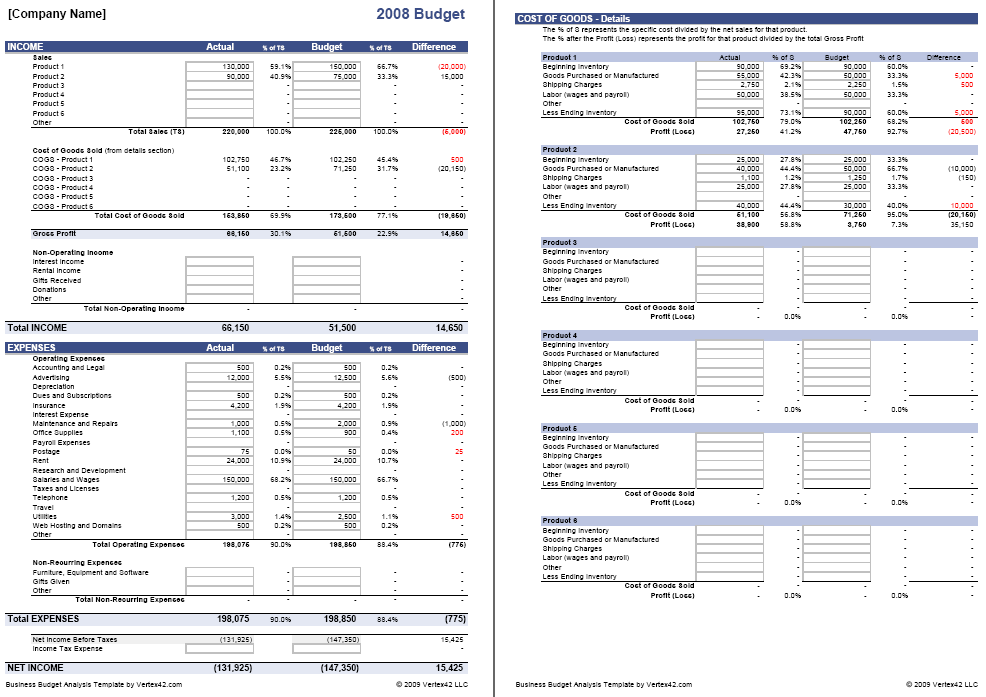
Description
This version allows you to perform a detailed analysis of your business expenses and cost of goods sold (COGS) if you are selling multiple products. Columns are also included for calculating the Percentage of Total Sales for each product and the various expenses.
License: Private Use (not for distribution or resale)
Using the Business Budget Spreadsheet
These business budget templates are pretty simple to modify and customize. However, here are some things you should know and keep in mind as you use these templates:
Double-Check the Formulas
If you add or move categories around, make sure to double-check the calculations, especially the SUM() formulas that calculate the totals and subtotals, to make sure that the right cells are summed.
Conditional Formatting for red Values
The Difference is calculated as Actual - Budget. Conditional formatting is used to highlight the Difference red if income is less than the budget amount or if business expenses are more than the budget. In other words, a red value means you ought to take a closer look at it.
Analyzing Cost of Goods Sold
The costs associated with producing and purchasing goods are variable costs that increase or decrease with the volume of production and sales, such as wages for direct labor required to produce the goods, packaging, inventory purchases, shipping, and commissions. These costs are usually compared to the total sales. A careful study of these costs can help you determine pricing for your products, which products are more profitable, etc.
Multiple Products
The Goods spreadsheet is set up initially to record total net sales for each quarter. If you want to perform a more detailed analysis for multiple products, you can insert additional rows and separate the sales and costs according to product, or you can use the bonus spreadsheet that is designed for performing a detailed analysis for multiple products.
Income Taxes
A separate section under business expenses calculates the Net Income Before Taxes by subtracting the Total Expenses from Total Income. This helps you make a simple estimate of the income taxes, assuming all the Expenses are tax deductible. If you have any taxable expenses make sure to subtract those values from the Net Income Before Taxes before estimating your income tax budget.
Budgeting Large Non-Recurring Expenses
One of the reasons for budgeting is of course to help you determine whether you will be able to afford upgrades, new construction, asset purchases, etc. However, this budget spreadsheet is mainly for comparing your operating income and expenses to make sure that in your normal business activities you are earning more than you are spending. You would typically look at your Net Income to determine whether you will be able to expand your business, make large asset purchases, etc.
More Business Budgeting Resources
- Small Business Budgeting Tips and Techniques at investopedia.com
- Drafting Your Budget at entrepreneur.com

 Make a Budget