Simple Loan Calculator
Some loan calculations can be very simple, and the purpose of the simple loan calculator spreadsheet below is to demonstrate this with Excel. Unlike many of our other mortgage and loan calculators, our Simple Loan Calculator uses just the basic built-in financial formulas to calculate either the payment (using the PMT formula), the interest rate (using the RATE formula), the loan amount (using the PV formula), or the number of payments (using the NPER formula).
Online Loan Calculator
You can use this online calculator to perform quick calculations, or you can download the spreadsheet to see how to use formulas in Excel.
Simple Loan Calculator
Simple Loan Calculator
for Excel and OpenOffice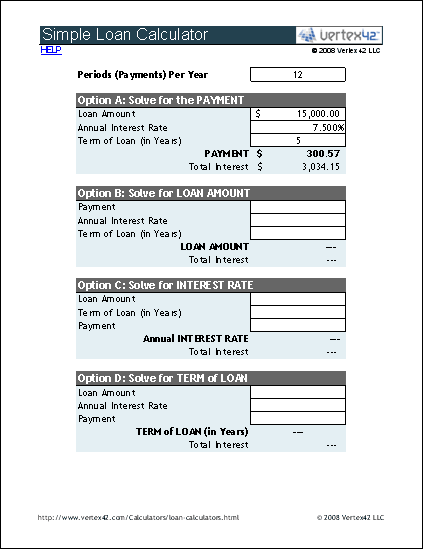
Download
⤓ ExcelOther Versions
License: Personal Use (not for distribution or resale)
"No installation, no macros - just a simple spreadsheet" - by Jon Wittwer
Description
This loan calculator uses the PMT, PV, RATE, and NPER formulas to calculate the Payment, Loan Amount, Annual Interest, or Term Length for a fixed-rate loan. Useful for both auto and mortgage loans. See below for more information.
How to Use the Loan Calculator Spreadsheet
This calculator demonstrates 4 different types of loan calculations. Descriptions for each of the fields are provided below, as well as examples for how to use each of the options.
- Periods Per Year: The number of payments per year. Enter 12 for Monthly, 52 for Weekly, 1 for Annual etc.
- Loan Amount: This is the amount that you have borrowed. You can also enter your current balance, if you also adjust the Term of Loan to be the number of years left to pay off the loan.
- Annual Interest Rate: This calculator assumes a fixed interest rate, and the interest is compounded each period.
- Payment (Per Period): This is the amount that is paid each period, including both principal and interest (PI).
- Term of Loan (in Years): Mortgage loans usually have 15 or 30-year terms. Auto loans are usually between 2 and 5 years. For a 6-month term, enter =6/12 or 0.5. If you entered your current balance in the Loan Amount, then for the Term enter the number of years you have left until your loan is paid off.
Option A: Solve for the Loan Payment using PMT()
Use this option when you know how much you need to borrow and want to find out how the interest rate or term affects your payment. For example, a 5-year, $15,000 loan at 7.5% interest results in a monthly payment of $300.57. The total interest paid over the life of the loan is calculated to be $3,034.15.
Option B: Solve for the Loan Amount using PV()
Use this option when you know how much you can afford to pay each month and want to find out how large of a loan you might get. Keep in mind that there may be other fees in addition to standard loan payment (principal+interest), such as insurance, taxes, etc.
For example, with a $250 monthly payment, if you got a 5-year loan with a 6% interest rate, the loan amount is calculated to be $12,931.39.
Option C: Solve for the Interest Rate using RATE()
It isn't as common to solve for the interest rate because you may not have any control over what your interest rate can be (other than shopping around for the best one). However, this option may be useful for academic purposes.
Option D: Solve for the Term using NPER()
Use this option if you want to pay off your loan early by making extra payments. For example, refer back to the example for Option A. For the same loan amount and interest rate, if you pay $60 extra each month or $360.57, the term is calculated to be 4.03 years (instead of 5 as in option A) - meaning you'd pay off your loan almost 1 year early. You'd also end up paying about $600 less interest overall. This assumes that there are no penalties for making extra payments.
Some people prefer to get loans with longer terms and make regular extra payments. The benefit of this approach is that if you run into hard times, you can stop making the extra payments. The downside is that if you don't have the discipline to make the extra payments, you'll end up paying more interest overall.
More Loan Calculators
- Amortization Schedule - Create a loan amortization schedule and make arbitrary extra payments.
- Auto Loan Calculator - Designed specifically to help with buying a car.
