
◄ Return to the Gantt Chart Pro page
Thinking about purchasing Vertex42's Gantt Chart Pro spreadsheet for Excel or Google Sheets? If you have any questions about the purchase process or licensing, please read this post. If you still have questions, please contact me (Dr. Wittwer) or leave a comment below (email is much better and faster).
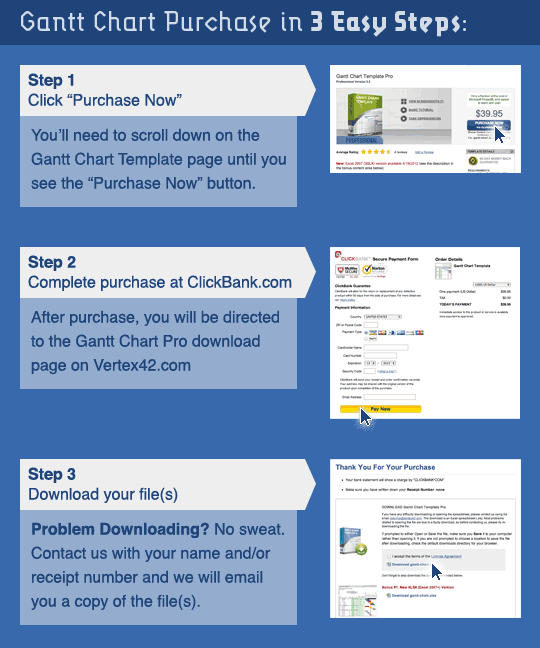
Is the purchase an immediate download?
Yes. See the diagram below.
Will I be charged a subscription fee? Are there any other hidden costs?
No and No.
The Purchase Now link doesn't seem to be working
Most of the time this is because you may be working on a computer that has a firewall preventing access to clickbank.com or clickbank.net. If you are unable to make purchases from ClickBank, you can try using a different computer or network.
Can I share the file with my colleague/team?
Yes, and you do not need to purchase separate licenses to do so. Please read the "Limited Use" and "Limited Private Sharing" sections of the license agreement for clarification. Note that if your "team" consists of members outside your company, then they may use the spreadsheet, but if they want to use it for any other project, they need to purchase their own license for their own company.
What is your refund policy?
60 days, no hassle. If you want to explain why you want a refund, that would be very helpful to me, but you don't need to. You don't even need to contact me if you want a refund - your email receipt contains a link that can take you to the trouble ticket system where you can request the refund with a few clicks of your mouse button.
I purchased an older version but would like to try the new updated version. Do I need to make a new purchase?
No. First, trying returning to the download page by logging in with your receipt number and email. See the link below. If that doesn't work, send me an email including your receipt number.
I need a receipt. Will I get a receipt?
You will receive an email receipt automatically after your purchase. You can also print a copy of your receipt after making your purchase. If you need a receipt and don't receive the email or forget to print a receipt, contact us and we can verify your order and send you a receipt.
Will I be able to start using the download immediately?
Yes, assuming there are no technical problems during the purchase process. Download problems are the most common, occurring in about 1 out of every 50 purchases. Your company might have a firewall you don't know about, or you might accidentally close your browser window before the process is complete. Whatever the case, if you make a purchase and don't make it to Step 3, just email us.
What do I do if there is a problem?
If there are problems after your purchase, contact us. You can expect a response within a 1 business day, depending on where you are in the world. If it's a download problem, the resolution will be to email a copy of the file to the address given during the purchase process. Please add "vertex42.com" to your email's white list to avoid having our response to your questions/problems blocked by your email filter(s).
Do you offer phone support?
No. I used to, but I found email to be more effective. Most support questions are not the type that somebody in a call center somewhere would be good at answering. I handle all technical support requests, and I prefer to do this via email. I usually respond to email within the same business day, depending on what time of day I get the email.
What do I do if I have problems using the spreadsheet?
First, watch the demo videos on the main Gantt Chart Pro page. Second, look through the Help worksheet. Third, check the website for FAQ information. Fourth, contact us.
May I use the spreadsheet on both my Company and Personal computers?
Yes.
I am a reseller. May I license the Gantt Chart Template and resell it to a customer?
Sorry, no. We don't work through resellers.
I work in my company's purchasing department. Can I purchase the spreadsheet with the company card and then email it to the requester?
Yes. You should also send the user a copy of the receipt # in case the user has a problem using the spreadsheet and needs to contact vertex42.com.
Can we add our company logo?
Q: "The license agreement says you can't remove the Vertex42 logo, but we want to be able to add our logo and send a PDF of the project schedule to our subcontractors." A: The Vertex42 logo and copyright notice is outside the print area, and you can add your own logo by inserting it as an image.
What are the printing options? Can I change the paper size to 11x17 paper?
You can modify the Page Setup and Print Settings and set the Print Area in Excel as needed.
In the full version, can I use Autofilter and/or hide rows to show only tasks for a particular subcontractor?
Yes. If you know how to use Autofilter, go for it. But don't use Sorting. Sorting can mess things up really bad.
How do I unlock the spreadsheet?
First of all, the free spreadsheet and the Pro version are NOT locked. The Pro version and all of the bonus spreadsheets are completely separate spreadsheet and they are not locked, meaning that the worksheets are not password protected.
I am brand new to Excel. How hard will it be to use this template?
Difficult to say. Did watching the demo videos overwhelm you or make it look easy? I designed this spreadsheet primarily for people who want a very simple way to create a Gantt chart or project schedule and already have a basic understanding of Excel.
In short, try a free version first! If you can copy/cut/paste/insert rows, enter task descriptions, start dates, and task durations, that's almost all there is to it. The more spreadsheet experience you have, the more you will be able to do with the template (such as creating task dependencies), but if the only thing you want to do is create a simple project schedule, you can do that with almost no spreadsheet experience. That is what Excel templates are for, after all.
Is there a way to transfer my info from a free Gantt chart to the Pro version?
No automated way, no. The Pro version does not contain any special import feature (because it does not contain any VBA macros). If you prepare the Pro version with enough new rows, you could probably copy the task descriptions and use Paste Special > Values Only, so that you don't overwrite any formulas or formatting. But ultimately, you'll need to create your schedule again in the Pro version if you want to use the Pro spreadsheet instead of a spreadsheet that you have already been using.
Comments
Will this program work with Microsoft Excel Starter 2010?
I just want to confirm that you can up this on as many computers as you need to.
@Arrow … Yes, you can use the template on multiple computers. The license is related to the person(s) using it, not the number of computers.
I have bought gant chart pro, but forgot to download all other charts on the bonus side. I want to do it, how can I get them?
You can return to the download page by following the instructions on the Support Page.
Good day.
When i buy the full licensed version, can I share it with my co-workers (team members) so that each and everyone can add / modify the spreadsheet, or we have to buy separate licence for each user.
We are a team of 6.
Thanks,
Amos
@Amos … Yes, you may share the Gantt Chart Template with your team members (making sure that they also abide by the terms of use) without having to buy a separate license for each user. Usually, the file would be placed in a private shared network location, and you’d keep a backup copy of the original template on your computer.
Where would I find a price list for your products? My application is personal-home use only
Thank you
@Miles … there is only one price for Gantt Chart Template Pro. We don’t have a price list for the rest of the templates because most are free and for those that are not free, most people only buy the particular template they are interested in.
Can I track multiple projects with this template?
@Doug … You could use a separate copy of the worksheet for each project.
Anyone familiar with a template for what I will call “adbooks”
Keeping track of advertiser submitted print ads for a fundraising adbook – when submitted, when approved, keeping track of how many pages of ads….
Thanks in advance.
Will this template work on OpenOffice Calc?
@Jason, there is a version of the free template submitted to the OpenOffice.org template gallery – see the “Get OpenOffice Version” link. The Pro version may have issues with the form controls (which might require minor fixes), but otherwise it should work okay. I haven’t tested it in OpenOffice lately.
Hi
In the unlock version will I be able to add columns in front of WBS and in between Tasks and Task Lead. I require more description
Thanks
@jim … Yes, if you are comfortable enough with Excel.
Hello Jon.
I am interested on the GanttChart Template Professional, US39.95
Is this price only for 1 template or there are numbers of various different Ganttchart templates in this product.
Look forward to you soon reply
Regards
kHANG
ang@thainippon.co.th
The purchase will allow you to download the Gantt chart template for Excel 2003 (.xls) and the one for Excel 2007+ (.xlsx) plus plus each of the files that are listed as the bonus spreadsheets. Not sure what other types of Gantt chart templates you’d be expecting, but you are welcome to make suggestions if you don’t find what you need.
Jon —
Thank you so much for your wonderful products — I am a the proud owner of your Professional Gantt spreadsheet and I have a question that I’m hoping you can easily answer. If not, I’ll keep plugging: I would like create a custom filter for the WBS column (A) that follows the Level 1, 2, 3 etc. (expressed 1, 1.1, 1.1.1) so I can easily expand or collapse the level of detail, if that makes sense. I’ve experimented with different language (contains 2 decimal places) without success, but I am very new to filtering and relatively new to the higher level workings of Excel so doubtless I’m missing some basic knowledge.
Thanks in advance and again for Vertex 42’s offerings.
Jessica
Jessica, if you select just the WBS values and turn on the Data > Filter, you’ll see that you can’t filter by level. However, if you were to insert another column before column B and use that new column to specify whether the task is level 1, 2, 3, or 4 then you could filter using Data > Filter based on that column.
Jon,
I downloaded “checkbook-register.xlsx.” I thought it was free but after downloading I see there is a fee for it.
Have not used the program yet because I do not want to start using it and then have all my stuff disappear or find out that I cannot buy it. The program appears to be exactly what I am looking for so I am wondering how much the program is and why don’t you have the prices posted on your website?
Also, upon downloading the program it is opened in “Read Only” mode. Is that the way it is supposed to be?
Dre … There is no fee for the checkbook-register.xlsx file. I’m not sure why you would think that. There are many reasons why a file would open in Read-Only mode, but none that have to do with any inherent limitation built into the spreadsheet by me. The file is a simple spreadsheet with no built-in restrictions (other than those mentioned by the license agreement and copyright). See the support page regarding issues downloading and opening spreadsheets if you continue to have problems.
Hi Jon,
The reason I thought there was a fee was because when I first opened the template there was a message that said I could only use it 24 times and then would need to purchase. Then I saw something on the website that said “Free to try for 30 days” so I was getting confused.
I just opened and closed the template over 24 times to see if that message would come up again and it did not.
The “read only” mode went away after I renamed the file.
I am used to using MS Money. I used that program for many, many years and apparently Microsoft no longer makes that program. I never used most of the features on the program but I did like to be able to create reports for whatever Payee I needed and I had all of my monthly/annual etc payees scheduled to automatically post to the register.
I believe that I can get by with this basic template and I will work with it some more but if you have anything that offers these other features or know of something inexpensive that does then please let me know.
Thank you.
Hi Dre,
Interesting, I don’t know what could be giving the message you saw, because the checkbook register doesn’t have any VBA. Using the checkbook register template, you could use a Pivot Table to summarize data by Payee. I don’t have anything that automatically exports/imports or creates transactions. You CAN copy previous transactions and insert the copied row(s) and then change dates.
Jon
Hi Jon,
I have been working with this template all day and it has been working real good for me. Guess I am just so used to something far more sophisticated even though I never used most of the functions. lol! I really do like this basic template….. in some ways better than the sophisticated programs. I just need to get used to the “simplicity” and my new way of doing things.
Thank you for your help!
Are future upgrades to the excel free?
@Clair … Future upgrades to Excel are not free – that’s a Microsoft thing. But, future upgrades of the Gantt Chart Template are free.
So if I purchase the full version and use the program to create a schedule, are you telling me I’m not able to send it to a fellow Associate to have it modified: that he needs to purchase a license also?
@Jeff … I have updated the license agreement to the same “private use” agreement as the free version. This gives you the right to share the spreadsheet privately within your company as well as sharing it privately with those who may ‘require’ it and you’ll see that one of the examples given is “sharing a project schedule with your project team”. But, even without that allowance, it’s still fair to require another company to purchase a license. That is the way it works with almost all other software after all.
I need proper derectives for the purchase of the latest version to ease my project management.
@Yoram, Unless you have a specific question, all I can say for now is please read this article and let me know if there is something that it does not cover adequately.
Im using a Mac AirBook THe operating system is OS X 10.8.4. , Also excel use is Microsoft Excel for Mac 2011.
Will there be problems installing or using your software?
TQ
The Gantt Chart Template requires no installation, and it should work in Excel for Mac 2011.
I want to buy the gantt chart template pro and it only cost $39.95. only. one time payment, that’s it?
Yes, a one-time payment.
Does this program have an iPad app that it can sync with?
@Steven … I’m afraid not.
Do you offer a military discount?
@Bill … I’m sorry, but there is no discount mechanism built into the payment processing system that I use (ClickBank.com)
The child reward/chore sheet had too much granularity for older children (teens)
re: http://images.vertex42.com/ExcelTemplates/weekly-attendance-record_large.gif
. Instead of a column for student names: months of the year
. instead of five days of the week four to five weeks in the month: for a single sticker each
. last column for extra reward sticker
all blocks much bigger to accommodate 0.8 inch square sticker
Is there something similar here?
@Stev … the image you are referring to is for class attendance, not rewards. Here is the link to my rewards chart templates: https://www.vertex42.com/ExcelTemplates/reward-charts.html
My school district would like to purchase a school calendar template that the calendar committee likes from your templates. Can you tell me how much the template/license agreement will cost? We would like to purchase because the school calendar would be most affective posted on our school website for families to access.
Thank you for your time,
Cathy
Hello Cathy,
Thank you for your interest. I don’t license my templates or calendars, even for a price. But, it’s okay to use the template to create a school calendar provided that the resulting thing you put on your site is a PDF of the calendar showing your specific school activities rather than a blank calendar template or the spreadsheet itself … and that you don’t remove the vertex42 “branding” from the calendar. If you have more questions about that, please email me. – Jon W.
I work on a mac computer. I have downloaded Apache OpenOffice and the free amortization schedule but I would like to purchase the $39 commercial version for use in OpenOffice. Is this available? Will the excel file work with OpenOffice? If not, will the commercial version work on Windows xp?
@Joyce, If the free version of the Excel file works for you, then the commercial version should as well. The commercial version of the loan amortization schedule includes a .ods version, but not a .ods file for all of the bonus spreadsheets. The amortization schedule was designed in Excel 2003 on a Windows XP machine.
I see a downloadable “free” trial version, but I can’t find a price on the “upgrade” version. Is this a monthly subscription? Or, is it a one-time purchase? Is it only a down-load, or can I get a back-up CD/DVD? Thanks!
@Dennis, Look lower on the gantt chart template page and you’ll see a description of the Pro version. Not a monthly subscription. It is a one-time purchase. It is a download, but you could back it up to CD/DVD after you download it.
Hi Jon,
I am very interested in the Time Tracking Template for use in my organization and would like further clarification on the terms of usage. Can the provided free Time Tracking Template be modified from the provided format/structure and functionality if the copyright and vertex42 logo are kept in place? My company is NOT involved in the commercial sale of software products or redistribution of software but is a commercial sales organization that sells non software related products. Can you please help me understand if there a commercial version and licensing strategy available that would work for usage in my 4 person dept. along with pricing information? My intent is to track my departments usage on internal projects and other initiatives and this would be a perfect fit for that, however, there are some changes to the format that would need to be made on template with respect to field additions/deletions. I would like clarity on this before going further. Is there someone I can contact for further clarification on your licensing and what you offer? The templates and material you provide are superb. Great job.
I’m very impressed.
Thanks
@Steve’O .. For questions about the license agreement, I usually request that people carefully read the license agreement associated with each of the templates. The agreements are written to be as clear as possible. Most of the license agreements on my website allow you to modify the template within limits (such as not removing copyright information). Sharing is always limited, but the agreement explains how it may be shared (or not shared). If you have specific questions after carefully reading the license agreement, you may email me.