Free To Do List Template
Download our free To Do List template to help you, your team, your family, or your organization. This template is already set up for auto filtering so that you can group the tasks by date, priority, status, etc. You also use the auto sort buttons to list the tasks in order by date, priority, etc. It is easy to print, so it's nice for people who like to check off or scribble out tasks by hand.
You can also use this to do list for a team project. For example, you can use the Owner column for assigning a specific person a task, and then email the spreadsheet, or use it collaboratively to keep track of your tasks and due dates.
To Do List Template
for Excel and Google Sheets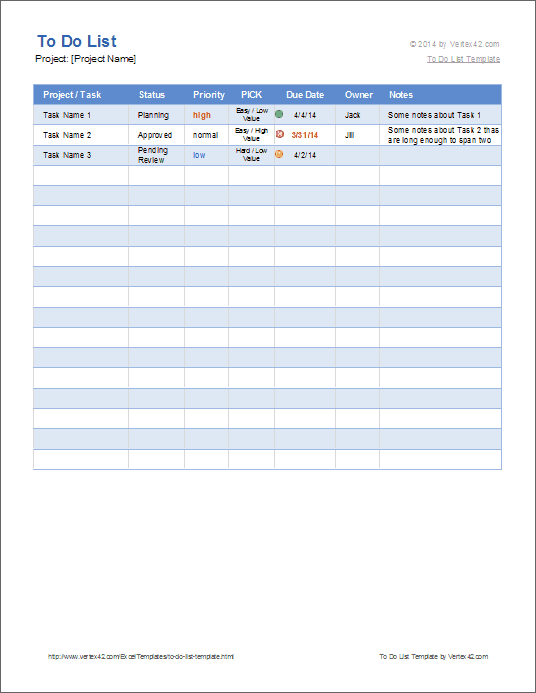
Download
⤓ ExcelLicense: Private Use (for for resale or distribution)
Author: Jon Wittwer
Description
This printable To-Do List helps you get organized. It is highly customizable and requires only basic spreadsheet knowledge to edit or customize. It can be adapted for your personal use or used collaboratively in a team environment.
When you select "Completed" from the Status column, a conditional formatting rule makes the font color in that row change to gray.
Related To-Do List Templates


Help Using the To Do List Template
The Vertex42™ To Do List template allows you the flexibility to use whatever codes, scales, or abbreviations you want for each of the columns. You can also delete one or more of the columns if you do not need it.
How to Use Autofilter and Sort in Excel
To edit the conditional formatting rules in this worksheet, go to Home > Conditional Formatting > Manage Rules and select "This Worksheet" from the drop-down. Learn more about conditional formatting.
In version 1.1.0, I added a few dynamic ranges that are used to populate the customizable drop down lists used for the Status and Priority columns. You can customize the items shown in those columns of the To Do List by editing the values in the Lists or Ref worksheet.
Status: You can enter values such as "Completed" or "In Progress" or abbreviations that you define yourself. You might also use this column to enter the percentage complete such as "50%" or "75%." Note: If you change "Completed" to something else, you may also want to edit the conditional formatting rule in the table.
Priority: You might want to use a 3-, 5-, or 10-point numeric scale for this column, where 1 is the highest priority. Currently, the Priority column uses conditional formatting to highlight "High" red and "Low" blue.
PICK: This is an acronym that stands for Possible, Implement, Challenge, or Kill. See the PICK Chart page for more information about this useful lean six sigma technique. If you don't need this column, just delete it.
Due Date: Enter values in date format. If the due date is earlier than today's date, the conditional formatting condition will make the date red and display a red dot icon. If the due date is today, a yellow warning icon is shown. If you'd like the yellow warning icon to show up if a task is due within 3 days (including today), you can update the rule for the icons by going to Home > Conditional Formatting > Manage Rules. Choose the Icon Set rule and click on Edit Rule. Change the formula for the Green dot to =TODAY()+2.
Owner: The person assigned to this task, or the person responsible for seeing that this task is completed.
Project/Task: A short description of the task to be completed.
Notes: Add notes for more clarity or special instructions, comments about sub-tasks completed, problems, etc.
More To Do List Templates
- Gantt Chart Template by Vertex42.com - For larger, more complicated projects, a gantt chart can be a great tool for creating a task-based project schedule.
- To Do List Templates by Vertex42.com - Make sure to check out our other to do lists.