Meal Planner Template
For a long time, my wife used a blank monthly calendar for planning our meals. Because she is proficient with Excel, I decided to create a simple weekly meal planner application that would allow her to select from a list of meals and side dishes, and it got a thumbs up review. So I went ahead and created a monthly version as well as a selection of printable meal and menu planners that you can download. She also wrote up some meal planning tips, that I've included below the downloads.
Weekly Meal Planner
for Excel, OpenOffice, Google Sheets, and Word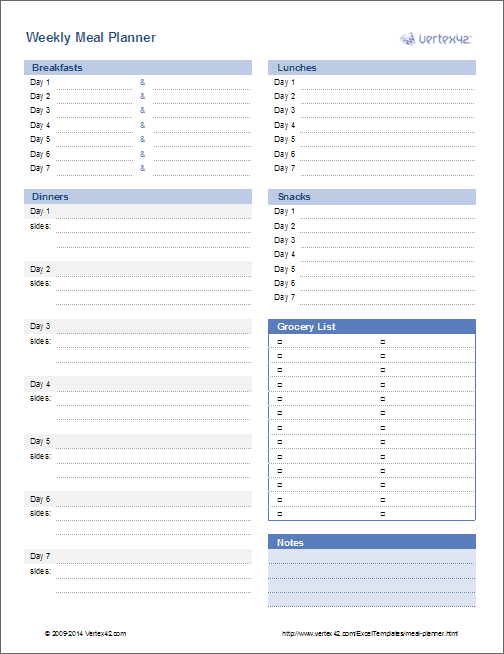
Download
⤓ Excel (.xlsx)License: Private Use (not for distribution or resale)
"No installation, no macros - just a simple spreadsheet" - by Jon Wittwer
Other Versions
Description
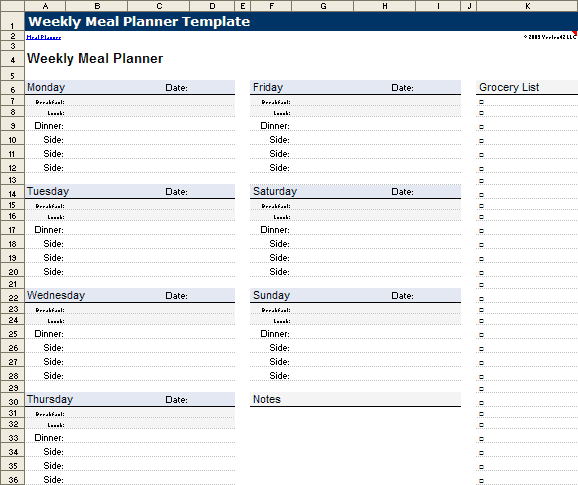
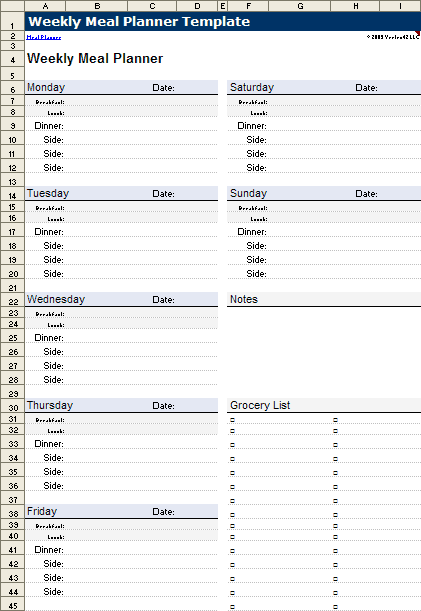
This spreadsheet makes it easy to create and print your weekly meal plan. The workbook includes all three layouts shown in the screenshots above as separate worksheet tabs. In addition to listing meals, these planners include a place to list groceries and other notes.
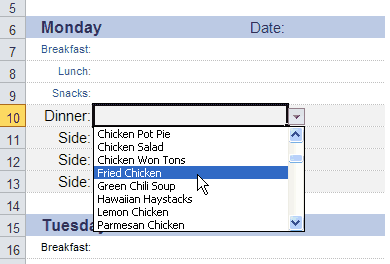
Easily select meals from Excel drop down lists! For each main dish, side dish, breakfast, and lunch entry, you can select an item from a drop-down list within the cell.
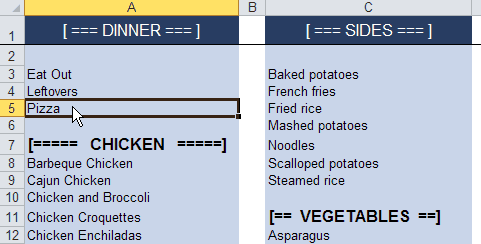
Easily customize your meal lists! We all have our favorite foods, and it is a piece of cake (no pun intended) to edit the lists.
Update 4/4/2014: I have updated the spreadsheet to work in Excel for iPad. It would be nice to edit (instead of just viewing) on the iPhone, but the iPhone version of Excel does not yet have the in-cell drop-down feature.
Update 10/11/2013: The image shown in the main screenshot above is a new layout based on an idea provided by a helpful user named Karen, from New York.
Printable Meal and Menu Plans
If you just want a blank planner that you can print right away, then try one of the printable meal and menu planners listed below. They are simply PDF files.


Monthly Menu Planner
for Excel, OpenOffice, and Google Sheets
Download
⤓ Excel (.xlsx)License: Personal Use (not for distribution or resale)
Other Versions
Description
This spreadsheet is great for longer-term planning. It contains lists for main dishes and side dishes and has the same type of drop-down list selection as the weekly version. If you prefer to write your meals out by hand, this template works well for printing blank monthly menu planners.
Important: When you change the month, only the dates change. The menu items stay the same. So, if you want to store different menus for different months, you'll need to create a copy of the Menu worksheet (and rename it to Jan, Feb, etc.).
Monthly Menu Planner with Grocery List
for Excel and OpenOffice
Download
⤓ Excel (.xlsx)Other Versions
License: Personal Use
(not for distribution or resale)
Description
This is a new version of the monthly menu planner. It lets you list ingredients for each meal so that you can create a grocery list automatically. It does unit conversions and includes a place to enter prices. If you think this looks too complicated, you should have seen my first few attempts.
I received many requests and suggestions from people to add a grocery list capability to the monthly version. I spent many many hours on this version, so please be very diplomatic in your expressions of disappointment or criticism. :-)
See below for instructions on how to print a condensed grocery list from the List worksheet.
Using the Meal Planning Templates
Both the weekly and monthly templates allow you to edit your lists of main dishes and side dishes. The weekly version also includes lists for breakfast and lunch. The screenshots below show how these lists are used to populate the drop-down boxes.
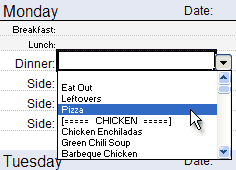
Screenshot showing the meal selection drop-down list within the planner.
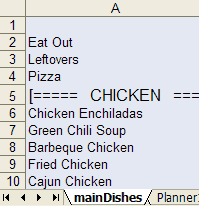
Screenshot showing the editable list of main dishes used to populate the drop-down lists.
The items in the list like [==== CHICKEN ====] are used to make it easy to see the different categories as you are scrolling through the list.
Except for the version with the grocery list, you can make copies of the worksheet. That will let you store multiple weekly or monthly meal plans within the same file. Right-click on the Planner tab and select "Move or Copy" and select the "Create a Copy" checkbox.
I designed the lists to be as easy to edit. You can delete and remove rows, sort, and do pretty much whatever you want as long as you don't delete cell A1. Doing so will mess up the formula used to create the dynamic named range which populates the drop-down lists.
Printing a Grocery List: When using the "Menu Planner with Grocery List" template, instead of printing all 3+ pages in the List worksheet, if you want to print a grocery list containing only the items you need, use the Filter feature. Here's how: First, select the Qty column, beginning with the label "Qty" and ending with the last line of the list. Go to Data > Filter to add a filter on this column. Click on the little filter arrow and uncheck the "-" option to temporarily hide the unneeded rows.
Meal Planning Tips
My wife has graciously provided the following tips meal planning tips, including ideas for how to use the meal and menu planners.
- Make a list of everything you like to cook or everything you have eaten in the last month. This will give you a start on your list of meals and you can add to it when you find new things. The planner gives you a starter list that you can add to or amend to fit your needs.
- Your meal plan can be reused from month to month or week to week. You can make three months worth of planners and then rotate them throughout the year. Or, at the end of the month or week, file the planner away until the next year. Then, you can bring it out a year later and have something to work from. I like this method, because then I can incorporate seasonal foods and my menus for July are distinctly different from the ones for December.
- Plan to use left-overs. You can vary the sides or the appearance, but left-overs save time and money. For example, BBQ chicken on Wednesday can become BBQ chicken pizza on Friday. Or Meatballs can be used for Sweet and Sour and then later in the week for Hoagies. You can serve Lemon Chicken twice, but the second time, serve it with potatoes instead of rice pilaf.
- Add recipes that you want to try to your planner. I am constantly printing or tearing out pages of new recipes, but if I don't put them on my meal plan, I never make them.
- Put your menu plan where you will see it. Save it on your desktop or print it out and put it on the fridge or the inside of a cupboard.
- Be flexible. If you order pizza, move the planned meal to the first week of the next month. If you don't feel like making Hamburgers, switch them with another night. The purpose of a meal plan is to make the dinner decision time less agonizing and to help you with your grocery shopping.
- Create a recipe file. When you create your planner, spend some time collecting the recipes or write down the page numbers. That way you don’t spend all of your prep time searching for that fabulous recipe.
- Involve your family. Ask for suggestions from your family for meals they want to eat for the month. There may be fewer complaints if they know they had a say in a few of the meals.
