Gas Mileage Log and Calculator
Download a printable gas mileage log that you can keep in your car or download our Mileage Calculator for Excel to create a mileage chart so you can see how your car is performing over time, and estimate the $cost per mile.
Download the Mileage Log
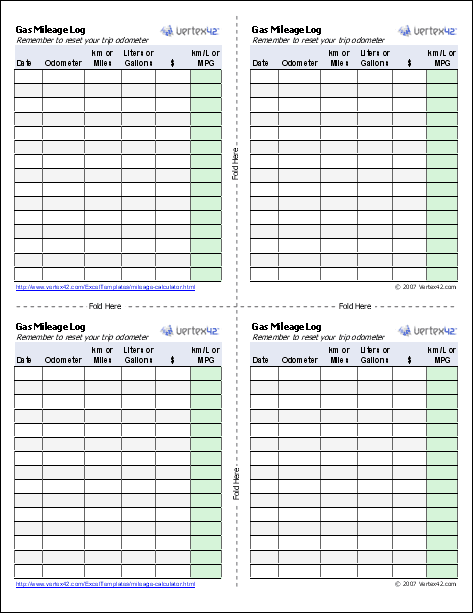
Download the PDF below and print it out. Whenever you re-fuel, take an extra minute to jot down your miles and how much fuel you've added. Use your trip odometer to make it easy to figure out how many miles you've traveled.

Printable Mileage Log (PDF)
Download and print this mileage log. Then fold it along the two dotted lines. This will make the log a convenient size and just the right thickness to allow you to keep it in your car and write down the date, odometer reading, amount of fuel put in, and the $ cost.
Works for both miles per gallon (MPG) or kilometers per liter (km/L).
Mileage Log & Calculator
for Excel
Download
⤓ Excel (.xlsx)License: Private Use (not for distribution or resale)
"No installation, no macros - just a simple spreadsheet" - by Jon Wittwer
Description
Calculate gas mileage and track it over time. Create a mileage chart so you can see your average gas mileage, estimate the cost per mile, print your mileage log, and see whether you can increase your mileage.
The mileage log works for both miles and kilometers.
In addition to tracking your gas mileage, use our new Vehicle Maintenance Log to track your auto repairs.
Create a Mileage Chart
After a few months, you'll probably have enough data to create a mileage chart. That is where the Mileage Calculator spreadsheet comes in handy.
Take a look at the example chart below. The blue line is the MPG for my car over the last few months. The green dots are the $Cost per mile. Notice that spike around June? I was doing a test to see whether I could improve my mileage by not accelerating so much. It made a big difference, but it was driving me crazy, so I couldn't keep it up. My car is supposed to get 28-32 MPG, but it was averaging 27, so I wanted to make sure it wasn't the car that was the problem. (In case you were wondering, this is a commuter car, so pretty much the only thing I changed in June was how much I accelerated when the stop lights turned green).

Another thing that you can see from the chart is the cost per mile. About 11 cents on average. That will obviously change with the gas and oil market, but it can be handy to know that value in case you are trying to estimate your fuel cost for a long trip or vacation.
Partial Fill-Ups
With the price of gas increasing, or if you have a very large tank, it is common to put in a limited amount of gas (like whatever the $20 in your wallet can get you), rather than completely filling the tank. This can mess up the mileage log, because you won't know exactly how much gas you used. Normally, you only know how much gas you used by completely filling the tank and reading the value off the pump.
If you run into this case, then on your print-out that you keep in your car, record the Date, the Amount spent, and the Fuel you added. When you record the value in the spreadsheet, you'll need to add these amounts to the values that you record the next time you fill up. For example, let's say that on 7/15/08 you spend $20, adding 5 gallons of gas, but not completely filling the tank. Then on 7/30/08 you fill up, adding 8 gallons of gas, costing $32. In the spreadsheet you'd record one entry for 7/30/08, listing the Odometer reading, 5+8=13 Gallons of fuel added, and $20+$32=$52 for the total Cost.
How to Avoid this Scenario: The only way to calculate the mileage is to know how far you went and how much fuel was used. So if you don't want to spend a hundred dollars on gas each time you fill up, then fill up more frequently, and don't let your gas tank get low. This is also a good practice to be prepared for an emergency - to avoid getting caught with an empty tank of gas when you need to flee from a fire, hurricane, flood, or an angry relative.
Gas Mileage and Fuel Economy Information
Best and Worst MPG at fueleconomy.gov - Is your car on the list? This site is a great place to find mileage information for various cars and trucks.
Saving Money on Gas at www.ftc.gov - Great tips for increasing your gas mileage.

