Data Analysis & Quality Control
Create control charts, box plots, histograms, pareto charts, and more with Microsoft Excel®

Excel is a popular tool for data analysis, especially among non-statisticians. This page lists some of the templates I've created over the years for performing some common tasks related to data analysis, Lean Six Sigma, quality control, and statistics. You may also want to see my article on Monte Carlo Simulation.
Advertisement
Quality Control Templates

XLSXCreate X-bar, R, and S Charts easily using this template.

XLSXRun a pareto analysis without having to create your own chart from scratch.

XLSXODSGSThis tool is useful for planning and assigning tasks. It's great for process improvement meetings and LSS events.

XLSXThis Lean Six Sigma tool helps you assign tasks into categories based on Value and Difficulty.

XLSXUses the JAM (Just-do-it, Abandon, Maybe) ranking method developed by Vertex42 to rank ideas and tasks using a simple action list.

XLSXPDFPrint a blank fishbone diagram for your brainstorming session, or create a cause and effect diagram using Excel.
Advertisement
Data Analysis
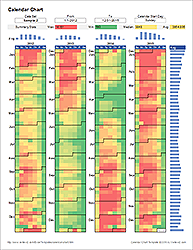
XLSXUse a calendar heat map to display how a data set varies with the days, weeks and months of the year.

XLSXCreate box and whisker plots in Excel to compare multiple data sets.
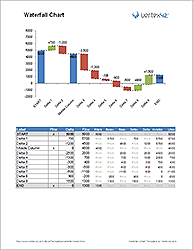
XLSXCreate a horizontal or vertical waterfall chart using Excel.
- Creating Dot Plots in Excel - This article demonstrates a technique for creating dot plots using the REPT() function.
- Create a Histogram in Excel - Explains how to create a histogram in Excel using a bar chart.
- Graphing a Normal Distribution - Download a spreadsheet that demonstrates a few cool tricks for working with a normal distribution in Excel.
- Guide to Monte Carlo Simulation - An article I wrote near the completion of my Ph.D. that explains the basics of Monte Carlo Simulation.
More Statistics, Quality Control, and Six Sigma Tools
- DMAIC Six Sigma Tools at systems2win.com - Though I've never used any of this company's tools, it is clear that these people have worked in the thick of six sigma.
- Statistical Functions for Excel by Roger Myerson of the University of Chicago - Dr. Myerson provides two free addins for enhancing the statistical functions and procedures of Excel, as well as an addin for creating tornado diagrams (for sensitivity analysis).