Contact List Template
Need to create a custom contact list? Whether trying to keep track of all your contacts or putting together a phone or address list for a specific occasion, Vertex42's free customizable Contact List Template can help you get organized. Great for clubs, organizations, families or your own personal needs, the Contact List Template will help you get off to a quick start. The template allows you to easily sort and filter by any heading, and it is ready for printing.
This template can be easily customized, turning it into an email contact list, an address list or simple phone list. Simply choose one of the predefined headings or create your own. Feel free to add as many columns as you want or delete a few for something simpler.
Contact List Template
for Excel, OpenOffice, and Google Sheets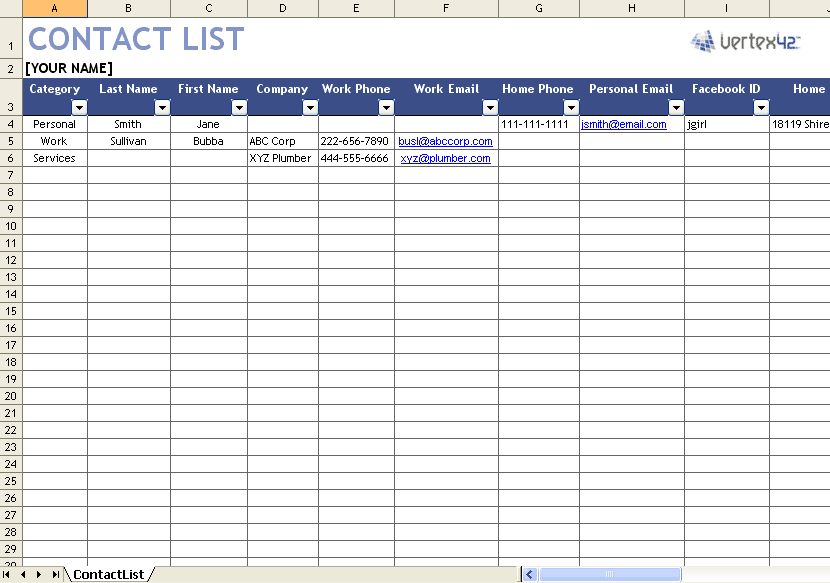
"No installation, no macros - just a simple spreadsheet" - by Jon Wittwer and Brent Weight
Download
⤓ Excel (.xlsx)⤓ Google Sheets
Other Versions
License: Private Use (not for distribution or resale)
Description
Vertex42's Contact List Template is easy to customize and simple to use. Now you can keep all your contacts organized and up to date!
You can add as many columns as you want, so you can use this list for keeping track of birthdays, anniversaries, and even mark which addresses to include on your Christmas card list.
The references listed below can help you set up your list for mail merge or importing into other contact list software (like Outlook and Gmail).
Creative Ways to Use Contact Lists
Using the Contact List
- Add additional columns to your address list by copying a column and changing the heading
- Consider adding a category or group column to help you organize your contacts. This will allow you to easily filter your list based on whatever categories you define.
- Use this template with Microsoft Word's mail merge feature to print form letters and envelopes. Great for envelope labels, wedding invitations and form letters.
- Simply save the Contact List Template as a CSV file to get started importing your contacts into other software such as Outlook and Gmail Contacts. See the resource links below for more information.
Related Templates
- Home Inventory List - Protect your property by creating a home inventory.
- Checklists - Download check lists for a variety of occasions.
- Family Tree Template - If you like to keep track of addresses for your family, what about important dates?
References: Mail Merge and Importing Your Contact List
- Excel and Mail Merge at support.office.com - Microsoft's guide to printing labels using mail merge and excel data. Instructions can also be adapted to print form letters or invitations.
- Import Contacts from Excel to Outlook at support.office.com - Step by step instructions from Microsoft on how to import from Excel straight into Outlook.
