Excel Calendar PRO
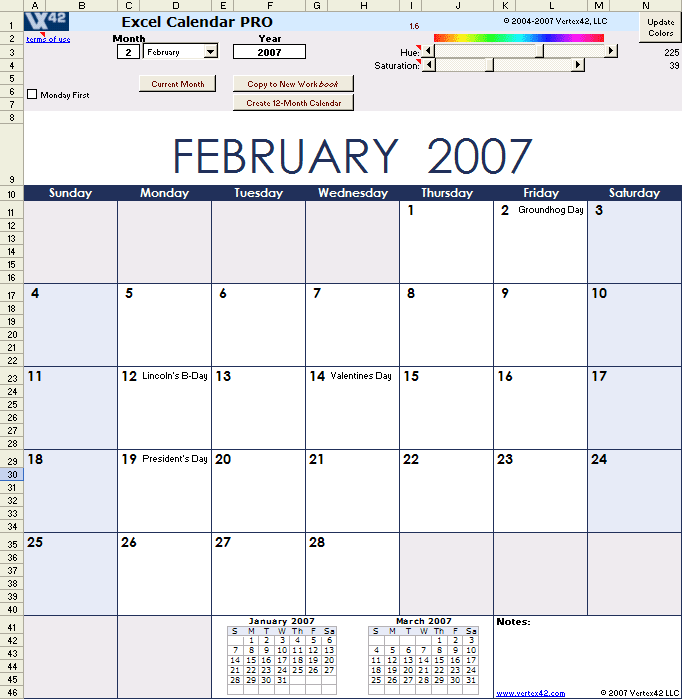
Excel Calendar PRO is an extension of Vertex42's free Excel Calendar. It provides a few additional features, such as mini calendars and a button to automatically create a 12-month calendar in a new workbook, beginning with the month of your choice. It allows you to add birthdays, anniversaries, and other special events. It also includes holidays such as Easter, Christmas, Mother's Day, Father's Day, Labor Day, Valentine's Day and important dates-to-remember such as Daylight Savings and the dreaded Tax deadline.
UPDATE 11/5/2015: I am no longer selling or supporting Excel Calendar PRO. If you would like a monthly calendar that includes holidays and a customizable list of events, try the new Monthly Calendar with Holidays template.
Excel Calendar PRO 1.7
DISCONTINUED


Generate multiple-month calendars starting with any year and month using this Excel calendar generator. With just a single click of a button you can create a calendar in a separate macro-free Excel Workbook.
This version includes many important holidays and events, and you can add your own annual events such as birthdays and anniversaries before generating the calendar.
Great for creating academic calendars starting with the month of your choice.
Price: Discontinued
License: Single User
FEATURES:
1) Annual holidays and events
Only in the Pro Version
- Christmas and Other Fixed-Date Holidays
- Easter - A custom VBA function
- Thanksgiving - 4th Thursday of November
- ML King Day - 3rd Monday of January
- Mother's Day - 2nd Sunday of May
- Father's Day - 3rd Sunday of June
- Parents' Day - 4th Sunday in July
- Labor Day - 1st Monday of September
- President's Day - 3rd Monday of February
- Columbus Day - 2nd Monday of October
- Memorial Day - Last Monday of May
- Daylight Savings
- Vernal and Autumnal Equinox (1900 - 2099)
- June and December Solstices (1900 - 2099)
- Passover, Rosh Hashanah, Yom Kippur, and Chanukkah
- Ramadan (for 2009 - 2017)
- Aviation Day, Patriot Day, and Kwanzaa
- Add your own birthdays, anniversaries, and other special events.
2) Convenient Previous and Next Month Calendars
Excel Calendar PRO includes two linked images that display the previous and next month in the form of mini calendars. (These can be seen in the screenshot).

3) Simple Dynamic Color Scheme Controls
In order to add a bit of style to the calendar, you can modify the color palette using a very simple set of color controls. The HUE changes the main color scheme based upon the spectrum above the slider. The saturation varies from gray (0) to full color (100).

Dynamic color scheme controls.
This calendar uses Conditional Formatting to vary the background colors based upon whether the day of the week is Saturday or Sunday.
4) Automatically Copy the Calendar to a New Workbook
Only in the Pro Version
Excel Calendar PRO includes a macro button that lets you automatically copy the calendar into a new Excel workbook. The values and formats are copied, including the column widths and the color scheme. The mini calendars are also copied into the new workbook. This creates a macro-free calendar in Excel that you can customize to your heart's content.
5) Quickly Create a 12-Month Calendar
Only in the Pro Version
Using the "Create 12-Month Calendar" button, you can easily create a customizable calendar in a new workbook, where each month is on a separate worksheet. An option in the Settings worksheet allows you to modify how many months are created, so you can create a 6-month or 24-month calendar. This is great for creating academic calendars which usually start in July or August and run for 13-14 months.
Creating calendars using this macro is the preferred way to use Excel Calendar PRO because the calendar is created in a separate macro-free workbook that allows you complete control over formatting and event entry. Using features already built into Excel, you could (1) merge cells to add events that spans multiple days, (2) add hyperlinks that link to special event sites like conferences, (3) add images and clip-art.
6) Easy Printing
The excel calendar has already been set up to print to a normal letter-sized sheet of paper (in landscape). However, you can customize the spreadsheet to print to other sizes and orientations (by changing column widths and font sizes and/or using Excel's page-setup to fit the spreadsheet to other sizes).
Printing a Specific Range of Cells to Any Size Paper in Excel:
- Go to File > Print Area > Set Print Area.
- Select the range of cells you want to print.
- Go to File > Page Setup
- In the Page tab, select the "Fit To: " option
- Select print preview and change other printing options as needed.
- To change the paper size in the Page Setup window, press the "Options..." button and depending upon your printer, the paper size selection may be in the "Advanced..." settings.
7) *NEW* - Switch to Monday-first
Due to the increasing number of requests from our international customers, you can now change the calendar so that Monday is the first day of the week, with a single click! This is done using a checkbox like the one below:

What This Template Won't Do
It won't store the entries that you make into a database so that you can keep a history of your appointments or plans. Don't expect this calendar to behave like Outlook or other calendar software. It doesn't remind you when events are coming up.
Showing Ages on the Calendar
Some people have requested the ability to show a person's age in the calendar, when they enter a Birthday in the Events worksheet. I haven't added this feature to the download, but here is how to do it. Let's say that instead of displaying "Tom's B-day", you want to display "Tom's B-day - 31", where 31 is the age he will be on that day:
- First, let's say we're working on row 58 in the Events worksheet, where you've already entered Tom's birthday by entering a 2 in cell B58 and a 16 in cell C58.
- In cell H58, enter the base text "Tom's B-day"
- In cell I58, enter his birthdate (e.g. 2/16/1980)
- In cell J58, enter the formula for the age in years as =DATEDIF(I58,F58,"y")
- Now replace the text in cell A58 with the formula =H58&" - "&J58
This approach could also be used to show the number of years married on an anniversary.